Report

Author(s):
- Tim Norrgård
- Jouke Klinkenberg
- Mateusz Cieśliński
- Esther Sala Cao
- Victor Van Cauwenberghe
- Flavius-Cristian Blanariu
Acknowledgements
Abstract
Glossary
| Abbreviation | Description |
|---|---|
| EPS | European Project Semester |
| ISEP | Instituto Superior de Engenharia do Porto |
| USB | Universal Serial Bus |
| QR | Quick-Response |
| RAM | Random Access Memory |
| GHz | Gigahertz – billions of cycles per second |
| Internet | A global computer network providing a variety of information and communication facilities |
1. Introduction
1.1 Presentation
The team consists of six students from across the European Union, combining diverse skills and perspectives to develop a project. The goal is to create a solution that aligns with the principles of sustainability, inclusivity, and public engagement.
| NAME | STUDIES | LOCATION |
|---|---|---|
| Victor van Cauwenberghe | Civil Engineering | Belgium |
| Flavius-Cristian Blanariu | Industrial Informatics | Romania |
| Esther Sala Cao | Industrial Design and Product Development | Spain |
| Tim Norrgård | Electrical and Automation Engineering | Finland |
| Jouke Klinkenberg | Mechanical Engineering | Netherlands |
| Mateusz Cieśliński | Computer Science | Poland |
1.2 Motivation
All team members applied to this program with the goal of improving themselves and fostering effective teamwork. Here is the explanation of the motivations, and which is the team main motivation for choosing this project:
PERSONAL MOTIVATION:
- Jouke: I joined the EPS program in Porto to challenge myself by living alone in another country, where I’ll need to manage everything while speaking English. I am excited to meet new people, make potential future friends, while discovering the city’s and having fun.
- Mateusz: I really like to go off the beaten track in my education. The EPS program has allowed me to do so, allowing me to develop both my soft and hard skills in an interdisciplinary environment.
- Tim: I was interested in joining the EPS program because it provides the chance to work with individuals from all over Europe and in that way, I can learn more about many countries, cultures and personalities. I chose Porto in Portugal because of its mix of old historical culture and the artistic aesthetics and of course the good weather.
- Flavius: For me EPS means not only European Project Semester but also Extraordinary Porto Semester. That's because I have the opportunity to study in this beautiful city and work with great people from around the globe to finish my Bachelor's Degree with a special team project that will enrich my future career.
- Victor: I am excited to participate in the EPS project as it offers a unique opportunity to develop my skills in an international setting while collaborating with diverse and talented peers. I am driven by the challenge of exploring new ideas and creating impactful solutions that contribute to both my personal and professional growth.
- Esther: My personal motivation for the European Project Semester is the opportunity to grow personally and professionally while working in an international team. Also, to meet new people from different countries, improve my English, learn Portuguese and get to know Porto City.
CHOICE MOTIVATION:
The group's motivation is to turn the passive waiting time until public transport arrives into active one. We want to do this by involving public transport passengers artistically and creatively.
We want to find a way that people can display art in the city, creating a community that would never exist without it.
1.3 Problem
This semester, the focus is on addressing the issue of boredom experience while waiting for trains, metros, and other public transport. Public transport stations are monotonous and boring places where people pass and wait for their transport. It becomes very cumbersome as people get bored having to wait for it to arrive and not doing anything productive during that time.
Normally people only uses public transport because is the most optimal way to move around the city. But they use it without any interest or desire. This is a problem since using public transport is much better than going with your own car or by taxi for the environment. Since it is a very good gesture towards the environment, people should feel comfortable and be more engaged with these sites so as not to lose the habit of using them.
Our approach is to give people a way to connect in a more artistic way with public transport surroundings making them feel better, free to express themselves and that they belong to a community in some way. We also hope that graffiti vandalism can be reduced by providing engaging alternatives for passengers.
1.4 Objectives
This project aims to engage people using public transport artistically by creating their own drawings with a tablet or their phone that will be displayed on a large projection on a wall. The tablet will be available on the wall and they will be able to draw on their phone by scanning a QR code.
By transforming waiting time into a productive experience, this creative project aims to encourage interaction with the community and provide a way of self-expression.
The main goals are to improve the waiting experience and encourage creativity by providing a way to express themselves through digital drawing.
This will promote social interaction, creating a shared space where everyone can contribute to a collective piece of digital art and engagement by offering different themes each day or week to inspire new drawings and create visual impact. It will be accessible to those who do not have any electronic devices, thanks to the tablet, and will have an impact for those who draw or those who do not want to, they will simply be able to see and enjoy other people's artwork.
It is hoped that by offering this way of expressing themselves, graffiti artists will also contribute and showcase their artistic knowledge on the projector instead of on the walls.
1.5 Requirements
The interactive art project aims to engage metro passengers by allowing them to create drawings that are projected onto a large screen. Several requirements need to be stipulated to ensure the success and sustainability of the project. These requirements cover various aspects such as accessibility, product functionality, budget, sustainability, and marketing.
Regulatory Requirements
The system must be transparent with the customers concerning data privacy regulations to ensure no personal data is collected without their consent.
Budget Requirement is 100 €. In this price is included materials, hardware, and tests.
Product Requirements:
-USER ACCESSIBILITY: The system must allow users to participate via a QR code on their mobile phones or through a provided tablet.
-PROJECTIONS IN REAL-TIME: Drawings have to be displayed on the wall right after someone submits their drawing.
-WEEKLY THEMES: There must be different topics to draw each week to encourage engagement.
-INTUITIVE INTERFACE: The drawing interface must be intuitive for all publics.
-RELIABLE CONNECTIVITY: A stable internet connection is required to ensure smooth interaction between devices.
-MODERATION SYSTEM: A filtering mechanism should be in place to prevent inappropriate content from being displayed.
Environment and Sustainability Requirements:
-DURABILITY AND SECURITY: The tablet and screen must be securely installed to prevent theft or vandalism and the system should be designed to withstand prolonged use with minimal repair or replacement.
-ENVIRONMENTALLY FRIENDLY MATERIALS: Use sustainable and recyclable materials in construction wherever possible.
Marketing Requirements
-Develop a MARKETING STRATEGY to promote the interactive art installation (via social media campaigns, flyers, posters in metro stations).
-Highlight key aspects such as user engagement, creativity, and community interaction.
-Emphasize the eco-friendly approach and the project’s potential to make people participate.
1.6 Tests
To ensure the successful implementation of the interactive art project, a series of tests will be carried out to verify the functionality, user experience, and reliability of the system. These tests will assess various components, including the drawing interface, real-time projection, hardware setup, and overall user engagement. The goal is to ensure that the system operates smoothly, is user-friendly, and meets all project requirements. Additionally, the tests will identify any potential issues related to connectivity, moderation, and performance.
1. Functionality Testing: Ensure users can successfully draw and submit their artwork via QR code or tablet without issues.
2. Real-Time Display Test: Verify that drawings are instantly displayed on the large screen after submission, ensuring no delays.
3. User Experience Testing: Test if the interface is intuitive and easy to use for all age groups, ensuring accessibility and a positive user experience.
4. Connectivity Test: Ensure the system maintains a stable internet connection for smooth interaction between mobile devices, tablets, and the large screen.
5. Theme Rotation Test: Verify that weekly themes update correctly and display relevant prompts for users to engage with.
6. Moderation Test: Test the moderation system to ensure inappropriate content is filtered and does not appear on the public screen.
7. Hardware Durability Test: Assess the resistance of the tablet and screen to wear, damage, and potential vandalism to ensure durability.
8. Energy Consumption Test: Measure the power usage of the system to ensure energy efficiency and minimize power consumption.
9. Maintenance & Support Test: Simulate potential technical issues to evaluate the system’s troubleshooting capabilities and ease of maintenance.
1.7 Report Structure
| Number | Task | Description |
|---|---|---|
| 1 | Introduction | The team has been introduced, and the project is defined with a problem statement and objectives. |
| 2 | Background and Related Work | Analysis of the available solutions on the market and the problems addressed by the project. |
| 3 | Project Management | This chapter explains how the team organizes its work during the project. It also covers aspects of stakeholder management, risk management, and the definition of the project scope itself. |
| 4 | Marketing plan | Explanation of the strategy for launching the product on the market. |
| 5 | Eco-efficiency Measures for Sustainability | Explanation of the sustainable aspects to be considered in the project. |
| 6 | Ethical and Deontological Concerns | Explanation of the ethical and deontological aspects to be considered in the project. |
| 7 | Project Development | Explanation of how the project was evaluated. |
| 8 | Conclusions | Conclusion of the main aspects of the project and the final product. |
| 9 | Bibliography | List of sources used. |
2. Background and Related Work
For this project the team has chosen to focus on the topic “Digital art” by also implementing the topic “Our city experience”. The team’s goal is to kill the boredom and vandalism in public transport stations by creating an initiative that people can interact with, contribute to and appreciate artistically.
This chapter will define the background for the project and present similar existing technologies and initiatives. The discussion begins with an overview of interactive public art, focusing on how digital tools are utilized to create engagement and creativity in public spaces.
Existing technologies that have been employed to facilitate interactive art include digital drawing pads, projection mapping, and interactive screens. These technologies play a big role in bringing interactive art to life in public settings.
The chapter also covers inspirational projects, which range from interactive metro installations to digital drawing experiences. The review provides insight into previous solutions and helps outline a unique aspect of the current project.
From this background, it becomes clearer how the project fits into the world of interactive public art and what makes it different from others. This review helps place the project in the right context within interactive art and digital spaces.
2.1 Concepts
In this section, we explain the main ideas behind our project. These concepts help to understand how our project works and why it is relevant.
1. Interactive Public Art: Art that allows people to participate and contribute, often using digital technology to create a shared experience.
2. Digital Drawing: Making drawings on a tablet or phone instead of using traditional materials like paper and pencils.
3. Projection Technology: Using a projector to display images or videos on a large surface so everyone can see the drawings in real-time.
4. User Engagement: Encouraging people to interact with the project, either by scanning a QR code on their phone or using the provided tablet.
5. Thematic Art: Changing themes every week to keep the project fresh and inspire new drawings.
6. Real-Time Interaction: Making sure that drawings appear on the big screen as soon as they are submitted, so users see immediate results.
7. Sustainability: Using recycled materials and energy-efficient technology to reduce waste and environmental impact.
8. Public Space Innovation: Bringing creative and interactive experiences to everyday places like metro stations, making waiting times more enjoyable.
These ideas shape the project and provide an explanation of the targeted goals.
2.2 Products
To understand the background of the project, we looked at existing products and technologies with similar features. This helped us identify what makes our idea stand out. The research included digital drawing apps, interactive screens, and public interactive art installations.
Digital Drawing Apps:
Many digital drawing apps allow users to create artwork on tablets and smartphones. Some well-known examples include:
- [Adobe, 2025]: A drawing app with various brushes and tools, popular among professional artists.
- [2]: A widely used app for iPads, known for its intuitive interface and powerful features.
- [Sketchpad, 2025] (web-based): A free online drawing tool that works directly in a browser without installation.
While these apps offer advanced features, they are designed for individual use rather than shared public experiences. Our project introduces a collaborative aspect by allowing users to create drawings that are immediately displayed on a large screen, making it an engaging and interactive public activity.
Interactive Screens and Projection Systems
Large digital screens and projectors are commonly used for interactive applications. Some examples include:
- [Microsoft, 2025]: A large touchscreen used mainly in offices and classrooms.
- [Smartboards, 2025]: Digital whiteboards that enable people to draw and interact with content.
- [Epson America,, 2025]: Advanced projectors capable of transforming walls into digital canvases.
Unlike these systems, which often require direct touch interaction, this project allows users to draw on their own devices via a QR code or a provided tablet. This remote interaction makes participation more convenient and accessible, as users do not need to be physically close to the screen nor have a dedicated device.
Interactive Art Installations in Public Spaces
Around the world, various art installations encourage public engagement. Some examples include:
- [Nooah, 2011]: Digital walls where people can create art using light pens instead of spray paint.
- [MTA, 2024]: Large digital displays in metro stations that showcase digital art, sometimes incorporating interactive elements.
- [Urban Sketchers, 2022]: Community-driven projects where local artists’ sketches are digitally shared and exhibited.
Many of these installations focus on passive observation rather than active participation. By integrating simple digital tools, creativity and engagement, the project makes public art creation accessible to everyone, requiring no prior experience or technical skills.
2.3 Projects
The next chapter will explore various existing projects that can serve as inspiration for developing the proposed solution. Researching these projects is essential for gaining insights into past challenges, successes, and best practices. By analyzing similar initiatives, potential pitfalls can be identified and valuable lessons learned can be applied, helping to avoid common mistakes and improve the overall project development process.
Augmented reality panel in a metro station from Bucharest
When the QR code is scanned on the panel, the user will be redirected to an Instagram filter that activates an animation when the rear camera is directed towards the panel. This innovative feature offers a fun and engaging way to pass the time while waiting for the metro. See Figure 1 on how the Augmented reality panel in the metro station looks like.[s_cosmina, 2022]

ARTLENS Gallery at the Cleveland Museum of Art
The ARTLENS Gallery provides an interactive experience where visitors can create their own digital artworks. For example, you can design virtual pottery by mimicking the movements of a potter's wheel or craft digital collages using images from the museum's collection. Once completed, these creations can be explored further through the museum's mobile application. See Figure 2 on how ARTLENS Gallery at the Cleveland Museum of Art wokrs. [Cleveland Museum of Art, 2025]

Poietic Generator
Poietic Generator is a social-network game that enables participants to draw collaboratively on a shared digital canvas in real time. Each player controls a small section of the global mosaic, and together they create unpredictable and dynamic artworks. See Figure 3 on how the Poietic Generator setup looks like.[Olivier Auber, 1986]

2.4 Comparative Analysis
| Project/Product | Interaction Type | User Participation | Location/Accessibility | Unique Features |
|---|---|---|---|---|
| Augmented Reality Panel (Bucharest Metro) | Augmented Reality via Instagram filter | Individual users via mobile devices | Public metro station, accessible via QR code | Engaging while waiting; AR animation overlay on physical space |
| ARTLENS Gallery (Cleveland Museum of Art) | Interactive digital installations | Individual, in-museum interaction | Museum-based, physical presence required | Motion-based creation; integration with museum's mobile app |
| Poietic Generator | Collaborative digital canvas (online game) | Real-time, global collaboration | Online access, desktop/mobile | Collective art creation; dynamic and unpredictable results |
| Digital Drawing Apps (e.g., Procreate, Adobe Fresco) | Digital drawing tools | Individual use | Personal devices (tablets) | Professional features for artists; not designed for public or collaborative use |
| Interactive Screens/Projectors (e.g., Surface Hub, Epson) | Touchscreen/projected interaction | Requires physical interaction | Installed in classrooms, offices, or exhibitions | High-quality display; not designed for remote or collaborative public interaction |
| Proposed Project | Digital drawing + public display (QR-based) | Real-time collaborative drawing | Public spaces (e.g., metro), accessed via tablets/phones | Remote participation; live projection; rotating weekly themes; inclusive & spontaneous |
When comparing the selected products and initiatives to the project-solution, key differences and similarities emerge. Digital drawing apps like Adobe Fresco and Procreate are great for individual use, but they don't focus on public collaboration. The project allows multiple users to create artwork together, displayed in real-time on a public screen, which sets it apart from personal-use apps.
Interactive screens and projectors, such as Microsoft Surface Hub and Epson Projectors, are interactive but require direct contact with the screen. The project lets users participate remotely using QR codes or tablets, making it more accessible and encouraging wider public participation.
Unlike the ARTLENS Gallery, which is museum-based, The project focuses on creating spontaneous, community-driven art in public spaces like metro stations. It encourages creativity in everyday urban settings, making it more inclusive.
Finally, Poietic Generator also supports collaborative digital art, but the project emphasizes real-time interaction and changing themes each week to keep the experience fresh and engaging. This approach helps make the project more dynamic and adaptable.
2.5 Summary
This chapter talks about the background of the project and looks at similar technologies and projects. It explains how digital tools are used to create interactive art in public spaces, helping to engage and inspire people. Technologies like digital drawing tablets, projectors, and interactive screens play a big role in these kinds of art.
The chapter also goes over important ideas behind the project, like interactive public art, digital drawing, and projection technology. These ideas help to create an understanding how the project works and why it’s important. The chapter also highlights sustainability, showing how recycled materials and energy-saving technology will be used in the project.
Next, it looks at existing products, like drawing apps and interactive screens, that have similar features. However, the project stands out because it lets people participate in creating art from their own devices, like tablets or phones, and displays their drawings on a big screen in real-time.
Finally, the chapter shares examples of other projects, like interactive art in metro stations and museums, that inspired the project. These projects show how public art can bring people together and inspire creativity. The chapter ends by comparing the project to other similar projects, showing how it encourages public participation and changes themes each week to keep the experience fresh.
3. Project Management
Good planning is very important for the success of any project. This part explains how the project was managed from start to finish. It includes how the schedule was made, how tasks were divided, how the team communicated, and how the budget and possible problems were handled. The main goal was to keep the project moving forward, finish on time, not spend too much money, and make sure the final result had good quality.
3.1 Scope
The next chapter defines the project's boundaries by outlining both the scope for the project (Figure 4) and the scope for the prototype (Figure 5), which details the work required to achieve it. Clearly documenting these aspects helps prevent scope creep, set clear expectations, and ensure that all efforts remain focused on the project's objectives. A well-defined scope also improves efficiency, streamlines workflows, and provides a solid foundation for planning and execution, ultimately increasing the likelihood of project success.


3.2 Time
The next chapter outlines the deadlines that must be met, while Chapter 3.10 details the key phases when work on these deadlines will take place. Documenting key milestones and linking them to deadlines is crucial for clarity, accountability, and progress tracking. It ensures teams stay aligned, allows for early identification of potential risks, and enables timely adjustments. A well-structured timeline enhances efficiency and significantly increases the likelihood of project success.
Date Description
2025-03-01 Choose and share your top-3 preferred project proposals via email to epsatisep@gmail.com
2025-03-12 Upload the “black box” System Diagrams & Structural Drafts to the wiki (Deliverables)
2025-03-15 Define the Project Backlog (what must be done and key deliverables - every member should preferably participate in every task), Global Sprint Plan, Initial Sprint Plan (which tasks should be included, who does what) and Release Gantt Chart of the project and insert them on the wiki (Report) 2025-03-19 Upload the List of Components and Materials (what & quantity) to the wiki (Deliverables)
2025-03-26 Upload the detailed System Schematics & Structural Drawings to the wiki (Deliverables) and do the cardboard scale model of the structure
2025-04-06 Upload the Interim Report and Presentation to the wiki (Deliverables) [1]
2025-04-10 Interim Presentation, Discussion and Peer, Teacher and Supervisor feedbacks
2025-04-15 Upload 3D model video to Deliverables
2025-04-29 Upload the final List of Materials (local providers & price, including VAT and transportation) to Deliverables
2025-05-02 Upload refined Interim Report (based on Teacher & Supervisor Feedback)
2025-05-14 Upload packaging solution to Deliverables and Report
2025-05-28 Upload the results of the Functional Tests to the Report
2025-06-15 Upload the Final Report, Presentation, Video, Paper, Poster and Manual to Deliverables
2025-06-18 Final Presentation, Individual Discussion and Assessment (reserve the whole day)
2025-06-25
- Update the wiki, report, paper with all suggested corrections
- Place in the files section of the MS Teams channel of your team a folder with the refined deliverables (source + PDF) together with all code and drawings produced
- Hand in to the EPS coordinator a printed copy of the poster, brochure and leaflet
2025-06-26
- Hand in the prototype and user manual to the client
- Receive the EPS@ISEP certificate
- Bring typical food from your country
3.3 Cost
Cost management is a crucial aspect of the project, ensuring that expenses stay within the allocated budget while maintaining quality and functionality. In this project, total costs are divided into two main categories: materials and components costs (Tabel 1), and labor costs (Tabel 2).
3.3.1 Material and components cost
| Definition to buy | Component/Material | Weblink/Origin Component/Material | Price [€] | Backup Weblink/Origin Component/Material |
|---|---|---|---|---|
| Controller kit | Rasberry pi kit | [Botnroll, 2025] | 134.90 | [Kubii, 2025] |
| Protective case/stand for tablet | To be built (PLA printer) | [VIVA Lab, 2025] | 126.40 | [Imprima3d, 2025] |
| Screen protector tablet | Screen protector | Tablet depending screen protector | 20.00 | - |
| Used Tablet | Tablet | Second hands tablets from people | 75.00 | - |
| Used Pencil For tablet | Touch Pen For tablet | Second hands pensil from people | 10.00 | - |
| Projector | Project To Display The Drawings | [Optoma, 2025] | 989.00 | [Worten, 2025] |
| Protective case for projector | To be build (metal plats) | [Leroymerlin, 2022] | 8.49 | [BricoDepôt, 2025] |
| Total cost | - | - | 1363.79 |
3.3.2 Labor costs
| Definition for cost | Salary information | cost[€] |
|---|---|---|
| Monthly salary per employee | Standard junior engineer salary in Porto | 1500.00 |
| Employer’s social security | Portugal social securit 23.75% | 356.25 |
| Total employer cost per employee | Salary + employer contributions | 1856.25 |
| Total monthly cost for 6 employees | 6 × employer cost per employee | 11137.50 |
| Total labor cost for 5 months | 5 × total monthly cost | 55687.50 |
3.3.2 Total costs
| Definition for cost | Amount | cost[€] |
|---|---|---|
| Material and components | 1 | 1363.79 |
| Labor costs | - | 55687.5 |
| Total costs | - | 57051.29 |
3.4 Quality
In this project, quality is not just about how well the prototype performs, but also about how clear and well-organized the documentation is. That’s why the quality section is divided into two parts: the physical product and the documentation.
3.4.1 Product Quality
To ensure a strong and reliable final result, several important points were considered:
- Durability and materials: The prototype should handle stress and weight appropriately. This is checked through simulations. If the model doesn’t perform well, design changes are made.
- Functionality: All features defined in the project scope must be implemented in the final version. This includes user interaction via the tablet and accurate laser projection.
- Environmental impact: Whenever possible, materials are sourced locally (from Belgium or nearby countries) to reduce emissions from transportation. Using second-hand devices like tablets also helps lower electronic waste and environmental footprint.
3.4.2 Documentation Quality
Good documentation helps explain the project clearly and makes it easier to understand for others. A few key rules are followed:
- Clarity: The language is kept simple and professional. Technical terms are used when needed, but long or overly complex sentences are avoided.
- Style and formatting: Documents follow a consistent style, same fonts, sizes, structure, and color scheme. The ISEP and project logos are always included.
- Consistency: All parts of the report are connected logically. Each section builds on the previous one, helping the reader follow the project story from start to finish.
These quality checks help maintain high standards across the physical build and the written materials. Simulation results, which confirm product reliability, are explained in the technical development chapter.
3.5 People
At the beginning of the project, roles were discussed based on each team member's background and strengths. This helps make sure everyone is working on tasks they’re good at and feel confident with. Some members focus more on the technical side, like hardware and simulations, while others handle the design, documentation, and planning parts.
Roles are not fixed and can change depending on the task or sprint. The group meets every week during sprint planning to go over what everyone did in the past week, what still needs to be done, and if anyone is facing problems. This makes it easier to adjust tasks if needed and to support each other when someone is stuck.
Communication with the supervising teachers also plays a big role. They help guide the group, give feedback, and help find solutions when something is unclear. Their input keeps the bigger picture in mind and helps make sure the project is moving in the right direction.
In table (Table 4), see who are the project roles and responsabilities.
| NAME | ROLE | RESPONSABILITY |
|---|---|---|
| Team two | Owners | Develop the project working as a team and following the EPS guidelines |
| Benedita Malheiro | EPS coordinator | Organize the entire EPS project and accompany the team during the project process |
| Supervisors | Project supervisors | Supervise the team goes in the right direction and give advices |
| Teachers | Responsible for teaching the classes | Providing support and improvement tools |
| ISEP | Main sponsor | Provide financial support to the team to carry out the project |
| Public transport users | Target group | Test the product and give feedback |
| Local business | Cooperations | Support each other |
3.6 Communications
Communication within the team is essential to reach objectives and deliver strong results.
To stay connected, the team uses a WhatsApp group for daily communication. Members meet frequently during class time and also hold at least one weekly stand-up meeting. During these sessions, everyone reviews the tasks completed throughout the week and prepares for the scheduled Thursday meeting with the supervising teachers. When questions come up outside of class, discussions are held via WhatsApp.
A shared Miro board is used to take notes and collaborate in real-time. All project-related files are stored and organized in Microsoft Teams. Additionally, Jira helps manage weekly sprints and tasks, making progress visible and ensuring that everyone remains aligned throughout the project.
These criteria can be found in the table below.
| Group | Communication Channel |
|---|---|
| Team | Communication is conducted via WhatsApp and Microsoft Teams groups, along with dedicated meetings. |
| ISEP Teachers | Communication takes place through Microsoft Teams and emails, depending on each teacher’s preference. |
| Other EPS groups | Contact is maintained through WhatsApp for quick and efficient information exchange. |
| ISEP University | Official communication is carried out via email. |
| Potential users and social communities | Potential users are reached through social media platforms and relevant community groups. |
3.7 Risk
Before we begin defining specific risks for the DrawYourWay project, we must first define what specific criteria we will adopt for each term.
These criteria can be found in the table below.
| Probability | Description |
|---|---|
| Rare | A virtually impossible situation, with less than a 5 percent chance of happening. |
| Unlikely | The possibility of occurrence is from 5 to 15 percent. |
| Moderate | A situation that has a 15 to 30 percent chance of occurring. |
| Likely | The chance of this happening is between 30 and 65 percent. |
| Very Likely | A very likely situation with a 65 to 100 percent chance of occurrence. |
| Impact | Description |
|---|---|
| Minor | A situation that does not affect or slightly affects the operation of the system itself, but is practically unnoticeable. |
| Moderate | A situation that causes a poorer user experience but does not cause general dissatisfaction, e.g. bugs in a mobile application. |
| Major | A situation that causes users to be dissatisfied with the system, e.g. obscene content. |
| Extreme | A situation that prevents the system from working. For example, application servers that are down. |
Risks occurring in the project can also be divided into 3 main categories.
Technical
These are problems related to all the operation of our system. Servers that may stop working, power outages or lack of network connection. Anything that may cause impairment of operation, inability to use the DrawYourWay application and platform. These are risks specifically related to all the technicalities of the project.
Ethical
These are things related to ethics and the user's use of the application. These include things like insulting specific ethnic groups or creating images or other graphic content that insults specific ethnic or social groups.
Vandalism
The project must also take into account possible acts of vandalism towards DrawYourWay devices. Tablets can be destroyed or stolen along with their styluses, and the drawing desks themselves can be painted over with graffiti. Screens in metro stations that also display images can be destroyed.

During the scope definition, discussions with facilitators and potential stakeholders, the following problems were identified, along with the assigned category and possible solution.
| Problem | Probability | Impact | Category | Possible Solution | Risk Response |
|---|---|---|---|---|---|
| Creating inappropriate content | Very Likely | Extreme | Ethical | Implement content filtering using AI along with manual moderation. | Proactive addressing of this risk through integration of AI-driven content filters supplemented by manual oversight. |
| System misuse due to lack of content moderation | Very Likely | Major | Technical | Introduce usage guidelines and actively moderate drawing sessions. | Effective control by establishing clear behavioral policies and implementing real-time supervision mechanisms. |
| Lack of knowledge on how to navigate the application | Very Likely | Moderate | Technical | Create an interactive tutorial that launches on first use. | Enhanced onboarding via an interactive, first-time-use tutorial facilitating intuitive navigation. |
| Lack of familiarity with the drawing creation tool | Very Likely | Minor | Technical | Provide a short guide and a demo mode to help users get started. | Alleviation of the issue through concise instructional content and a demo environment for exploration. |
| Insulting ethnic and social groups through drawings | Likely | Extreme | Ethical | Add a reporting system and implement account suspension for violations. | Implementation of a robust reporting framework with strict enforcement to deter and respond to violations. |
| No internet | Likely | Major | Technical | Implement offline fallback functionality with limited features. | Ensuring service continuity by integrating limited offline capabilities as contingency. |
| Theft of equipment | Likely | Moderate | Vandalism | Secure the devices with locks and install surveillance in public areas. | Deterrence of physical asset loss by reinforcing security infrastructure and deploying monitoring systems. |
| User confusion on first use | Likely | Minor | Technical | Add helpful tooltips and a quick-start overlay on launch. | Improvement of user experience with contextual tooltips and introductory interface overlays. |
| User data theft | Moderate | Extreme | Technical | Use end-to-end encryption and follow secure authentication practices. | Counteraction through stringent security protocols, including encryption and secure identity verification. |
| No electricity | Moderate | Major | Technical | Equip installations with backup batteries or emergency power systems. | Ensuring operational resilience by deployment of backup energy solutions. |
| System performance issues under high load | Moderate | Moderate | Technical | Optimize server infrastructure and implement autoscaling. | Preemptive management of performance degradation using scalable infrastructure and performance tuning. |
| UI glitches or layout bugs | Moderate | Minor | Technical | Perform regular QA testing and maintain a robust bug tracking system. | Maintenance of visual and functional consistency through rigorous testing cycles and issue tracking. |
| Hacking application servers | Unlikely | Extreme | Technical | Strengthen backend security through firewalls and intrusion detection. | Safeguarding system integrity via layered cybersecurity defenses and continuous threat monitoring. |
| Failure of backup systems | Unlikely | Major | Technical | Schedule regular automated backups and test recovery procedures. | Minimization of risk through automated redundancy strategies and routine recovery drills. |
| Finding the bug that causes the application to crash | Unlikely | Moderate | Technical | Use error monitoring tools and log analysis to track down crashes. | Adoption of diagnostic tools for systematic identification and resolution of crash-inducing anomalies. |
| Delayed bug fix affecting key feature | Unlikely | Minor | Technical | Improve internal processes for triaging and fixing critical issues. | Streamlining of development pipeline to accelerate resolution of time-sensitive bugs. |
| Destruction of the user database | Rare | Extreme | Technical | Implement redundant database systems with real-time replication. | Preservation of data integrity by architecting redundant systems with synchronous replication. |
| Service downtime due to dependency issues | Rare | Major | Technical | Use containerization and health checks to isolate and recover from failures. | Improvement of system reliability by containerizing services and implementing automated health recovery mechanisms. |
| Accidental admin misclick causing data loss | Rare | Moderate | Technical | Add confirmation prompts and role-based access control for critical actions. | Reduction of operational risk by enforcing role-based access restrictions and double-confirmation prompts. |
| Cosmetic UI misalignment | Rare | Minor | Technical | Include visual regression tests during the CI/CD pipeline. | Upholding UI consistency through automated regression testing integrated into deployment workflows. |
Description
| Problem | Description | Risk Response |
|---|---|---|
| Creating inappropriate content | Users may generate offensive or inappropriate content that violates ethical guidelines. | Mitigate |
| System misuse due to lack of content moderation | Lack of proper moderation may lead to misuse of the application. | Mitigate |
| Lack of knowledge on how to navigate the application | New users may have difficulties navigating the application without onboarding. | Mitigate |
| Lack of familiarity with the drawing creation tool | Users may not know how to start creating a drawing. | Mitigate |
| Insulting ethnic and social groups through drawings | There is a risk of users creating drawings that insult social or ethnic groups. | Avoid |
| No internet | Lack of internet access prevents the application from functioning properly. | Mitigate |
| Theft of equipment | Devices installed in public areas may be stolen. | Mitigate |
| User confusion on first use | First-time users may feel confused when launching the application. | Mitigate |
| User data theft | Sensitive user data could be intercepted by unauthorized parties. | Avoid |
| No electricity | Lack of power supply prevents the devices from operating. | Mitigate |
| System performance issues under high load | High traffic may lead to system slowdowns or crashes. | Mitigate |
| UI glitches or layout bugs | Visual glitches may negatively affect the user experience. | Accept |
| Hacking application servers | Attackers could compromise servers, leading to data breaches or service disruption. | Avoid |
| Failure of backup systems | Backup systems may fail, resulting in data loss. | Mitigate |
| Finding the bug that causes the application to crash | The app might crash due to unknown bugs. | Mitigate |
| Delayed bug fix affecting key feature | Delay in fixing bugs could affect critical features of the application. | Accept |
| Destruction of the user database | Total loss of the user database may occur. | Avoid |
| Service downtime due to dependency issues | Downtime could result from failures in third-party services or dependencies. | Mitigate |
| Accidental admin misclick causing data loss | Admin errors might cause unintended data loss. | Mitigate |
| Cosmetic UI misalignment | Minor UI misalignments that don't affect functionality. | Accept |
3.8 Procurement
Purchasing strategy is an important part of an organization. For drawyourway a sustainable, cost-conscious purchasing strategy is used.
The components in the project are mainly electrical or custom-made components. All electrical components are purchased. The custom-made components will be outsourced.
It was decided to purchase all components and have them produced by local companies. Considering the quantity to be purchased and the quantity to be produced, this is the cheapest and most sustainable solution. Because the purchasing and production of the components is done by local companies and shops, minimal transport is required. This means that the delivery time for the realization of the project is minimal.
The purchase of the controller kit will be done by a local company Botnroll because it is a company in Portugal. To be sure of the delivery of the controller kit, a backup supplier was chosen.
The production of the Protective case will be done by VIVA Lab. This is a small local 3D printing company and by printing at this company the local economy and technology are stimulated. Just like the controller kit, a backup company has also been chosen for printing.
For the tablet it was decided to purchase it second-hand. Because only the touchscreen functionality is needed and no advanced computing power, cameras or other functions, a second-hand tablet is the most cost-effective and sustainable choice to use.
The screen protector for the tablet will depend on the tablet that is purchased. Because this tablet is dependent and since screen protectors can be purchased locally in many places, there is no specific supplier for this.
Just like with a tablet, the drawing pen is also purchased second-hand to save costs and still maintain functionality.
For the projector there just chosen to have the provider that is the cheapest and a backup provider that is more local.
For the protective case for the project, the sheet metal is purchased from a local supplier. Here too, a backup supplier has been found to be sure of the delivery.
In short, for DrawYourWay local purchasing and production has been chosen to minimize transport and delivery time. Electronic components are partly purchased second-hand and custom components are outsourced to local companies.
| Item | Primary Supplier | Backup Supplier | Estimated Cost (€) | Lead Time (Days) | Shipping Time (Days) | Notes | ||||||
|---|---|---|---|---|---|---|---|---|---|---|---|---|
| Controller Kit | Botnroll (Portugal) | Kubii | 134.90 | 3–5 | 1–2 | Local purchase to reduce delays | ||||||
| Protective Case (3D) | VIVA Lab | Imprima3D | 126.40 | 2–4 | 0 (local pickup) | Supports local economy | ||||||
| Tablet (Second-hand) | Local reseller | — | 75.00 | 1–2 | 0–3 | Only touchscreen function needed | ||||||
| Screen Protector | Local electronics shop | — | 20.00 | 1 | 0 | Depends on tablet model | ||||||
| Drawing Pen (Second-hand) | Local reseller | — | 10.00 | 1–2 | 0–3 | Cost-saving, still functional | ||||||
| Projector | Optoma (cheapest online provider) | Worten | 989.00 | 5–7 | 2–4 | Cheapest option selected | ||||||
| Protective Case (Metal) | Leroy Merlin | BricoDépôt | 8.49 | 3–6 | 1 | For main project enclosure | ||||||
| Total | 1363.79 | |||||||||||
3.9 Stakeholders Management
It can be said that stakeholder management is a very important part of every project. However, since DrawYourWay is a project that targets the market related to Social media, we have to take great care of their interest in order to attract the audience, which is both the basis of our business and the basis of the entire application.
Stakeholders in our project can definitely be divided into 2 main groups - these are the groups we call “receiving” and “cooperating”.
The “receiving” group includes mainly social groups that will drive the development of our project and finance it from cooperation and transactions that will take place on the platform:
- People using social media
- Public communication users
- Brands that want to grow their business through online advertising
- Brands that want to build a deeper relationship with their customers through online and interactive activity
As for the collaborating group, there are, among others, entities that can greatly support the development of our business and actually make it happen:
- The EPS project team, which develops and builds the project along with the prototype
- Teachers and the ISEP university, which sponsors our project and mentors in matters related to its development
- Suppliers of electronic equipment that will allow for more favorable prices when building the physical part of the project
Stakeholder management table
| Key | Organization | Name | Power (1-5) | Interest (1-5) |
|---|---|---|---|---|
| A | Costumer | Social media users | 4 | 4 |
| B | Costumer | Public transport users | 5 | 4 |
| C | Supplier | Brands (advertising) | 3 | 3 |
| D | Supplier | Brands (engagement) | 3 | 3 |
| E | - | Competitors | 3 | 1 |
| F | Engineering | EPS Project Team | 5 | 5 |
| G | Collaborators | Teachers and ISEP University | 4 | 4 |
| H | Supplier | Electronic Equipment Suppliers | 4 | 2 |
Below is the power/interest chart for DrawYourWay Stakeholders.

This stakeholder analysis will be used to know stakeholders' concerns and will be reviewed during the project to address any new problems.
| Stakeholder | Quadrant | Strategy |
|---|---|---|
| A | Key player | Engage through platform features and marketing |
| B | Key player | Targeted outreach and integrations |
| C | Keep informed | Offer advertising packages and analytics |
| D | Keep informed | Provide tools for customer engagement |
| E | Minimal effort | - |
| F | Key player | Regular meetings and task management |
| G | Key player | Progress reporting and consultations |
| H | Keep satisfied | Negotiations and long-term partnerships |
3.10 Project Plan
The sprints are structured to span a duration of one week, ensuring a dynamic and iterative development process. Their schedule has been carefully outlined in the Global Sprint Plan Table 12, providing a clear framework for tracking progress and maintaining alignment with project objectives.
| Sprint | Start | Finish | Status |
|---|---|---|---|
| 1 | 27/02/2025 | 05/03/2025 | Finished |
| 2 | 06/03/2025 | 12/03/2025 | Finished |
| 3 | 13/03/2025 | 19/03/2025 | Finished |
| 4 | 20/03/2025 | 26/03/2025 | Finished |
| 5 | 27/03/2025 | 02/04/2025 | Finished |
| 6 | 03/04/2025 | 09/04/2025 | Finished |
| 7 | 10/04/2025 | 16/04/2025 | Finished |
| 8 | 17/04/2025 | 30/04/2025 | Finished |
| 9 | 30/04/2025 | 14/05/2025 | Finished |
| 10 | 15/05/2025 | 21/05/2025 | Finished |
| 11 | 22/05/2025 | 28/05/2025 | Finished |
| 12 | 29/05/2025 | 04/06/2025 | Finished |
| 13 | 05/06/2025 | 11/06/2025 | Finished |
| 14 | 12/06/2025 | 18/06/2025 | Ongoing |
The following project backlog outlines the key deliverables essential to the successful execution of the EPS project. These tasks have been meticulously structured in a logical sequence to ensure a coherent, efficient, and well-coordinated workflow. By adhering to this order, the project can maintain a seamless progression of work, minimizing disruptions and optimizing productivity throughout the project's lifecycle. The full breakdown of these deliverables can be found in Tabel 13.
| PBI | Title | Status |
|---|---|---|
| A | Define Project | Done |
| B | Black Box Diagram | Done |
| C | Structural Drafts | Done |
| D | Project Backlog | Done |
| E | Global Sprint Plan | Done |
| F | Initial Sprint Plan | Done |
| G | List of Components and Materials | Done |
| H | Detailed Schematics | Done |
| I | Structural Drawings | Done |
| J | Cardboard Model | Done |
| K | Upload Interim Deliverables | Done |
| L | S&P Assessment | Done |
| M | 3D Model Video | Done |
| N | Final List of Materials & Components | Done |
| O | Refined Report | Done |
| P | Packaging Solution | Done |
| Q | Functional Tests | Done |
| R | Upload Final Deliverables | Done |
| S | Final Presentation | Done |
| T | Transfer Scope to Canva | Done |
| U | Power Budget Analysis | Done |
| V | Project and Engineering Backlogs Definition | Done |
| W | Engineering Ethics Section | Done |
| X | Sustainability Section | Done |
| Y | Business Model Canvas | Done |
| Z | Flyer and Leaflet Design | Done |
| AA | 3D Model Updates (Tablet, Cabling) | Done |
| AB | UI Design and Application Screens | Done |
| AC | Controller Requirements and Draw Logic | Done |
| AD | Login and Registration Logic | Done |
| AE | App Authentication and API Tests | Done |
| AF | Raspberry Pi Setup | Done |
| AG | Multi-user Simulation | Done |
| AH | SWOT Analysis and Strategy Docs | Done |
| AI | User Manual and Assembly Guide | Done |
| AJ | Load and Stress Simulations | Done |
| AK | Risk and Liability Assessment | Done |
| AL | Marketing Programmes and Materials | Done |
| AM | Stakeholder Management | Done |
| AN | Burnup Charts and Sprint Refinement | Done |
| AO | Communication Plan | Done |
| AP | Procurement List and Sourcing | Done |
| AQ | Refine UN SDG section | Done |
| AR | Project Paper and Documentation | Done |
| AS | Final Deliverables Submission | Done |
| Sprint | Task | Duration | Responsible | Involved |
|---|---|---|---|---|
| 27/02/2025 - 05/03/2025 | ||||
| 1 | Choose topic | 5 | Everyone | Everyone |
| 1 | Jira's learning | 2 | Everyone | Everyone |
| 06/03/2025 - 12/03/2025 | ||||
| 2 | Blackbox Diagram | 1 | Jouke | Esther |
| 2 | Scope | 2 | Mateusz | Everyone |
| 2 | State of the art | 2 | Victor | Everyone |
| 2 | Drawings | 2 | Tim | Esther |
| 13/03/2025 - 19/03/2025 | ||||
| 3 | 3D Model File | 4 | Tim | Tim |
| 3 | Materials Cost | 1 | Everyone | Everyone |
| 3 | Engineering ethics | 2 | Esther | Everyone |
| 3 | Marketing chapter | 2 | Mateusz | Everyone |
| 3 | Sustainability | 2 | Flavius | Everyone |
| 20/03/2025 - 26/03/2025 | ||||
| 4 | Transfer Scope to Canva | 2 | Esther | Esther |
| 4 | Detailed Schematics | 2 | Tim | Tim |
| 4 | Define Engineering Backlog | 2 | Mateusz | Everyone |
| 4 | Project chapter | 4 | Jouke | Everyone |
| 4 | Improve Blackbox | 4 | Mateusz | Everyone |
| 4 | Project Development | 2 | Flavius | Everyone |
| 4 | Define Design Backlog | 2 | Victor | Everyone |
| 4 | Change report to impersonal form | 4 | Flavius | Everyone |
| 27/03/2025 - 02/04/2025 | ||||
| 5 | Power Budget Analysis | 2 | Tim | Tim |
| 5 | Add milestones and human resources to Gantt Chart | 2 | Victor | Victor |
| 5 | Add tablet and cabling system to 3D Model | 4 | Tim | Tim |
| 5 | Improve Business Model Canvas | 2 | Flavius | Flavius |
| 5 | Define Engineering Backlog Hardware | 2 | Tim | Everyone |
| 5 | Selection study for list of components/materials | 4 | Jouke, Mateusz | Everyone |
| 5 | Flyer | 2 | Esther | Everyone |
| 03/04/2025 - 09/04/2025 | ||||
| 6 | Controller Requirements | 2 | Mateusz | Mateusz |
| 6 | Authentication Logic On Backend | 2 | Mateusz | Mateusz |
| 6 | Create Repositories | 2 | Flavius | Mateusz |
| 6 | Install Dependencies | 2 | Flavius | Mateusz |
| 6 | Refine Flyer based on feedback | 5 | Esther | Esther |
| 6 | Refine 3D model based on feedback | 5 | Tim | Tim |
| 6 | SWOT | 5 | Victor | Everyone |
| 10/04/2025 - 16/04/2025 | ||||
| 7 | Drawing Screen | 2 | Mateusz | Flavius |
| 7 | Refining of the report | 2 | Victor | Victor |
| 7 | Create 3D model video | 2 | Tim | Tim |
| 7 | Drawing Logic | 2 | Mateusz | Mateusz |
| 7 | Set Up Raspberry PI | 2 | Jouke | Jouke |
| 7 | Application Screen Designs | 4 | Esther | Esther |
| 7 | Login Screen | 2 | Flavius | Flavius |
| 17/04/2025 - 30/04/2025 | ||||
| 8 | Register Screen | 2 | Flavius | Flavius |
| 8 | Forgot Password Screen | 2 | Flavius | Flavius |
| 8 | Packaging solution | 2 | Jouke | Tim |
| 8 | Word Breakdown | 2 | Mateusz | Mateusz |
| 8 | Marketing Conclusions | 1 | Mateusz | Mateusz |
| 8 | Leaflet | 2 | Esther | Everyone |
| 8 | Flyer | 2 | Esther | Everyone |
| 30/04/2025 - 14/05/2025 | ||||
| 9 | Load and stress simulation for 3D model | 2 | Jouke | Jouke |
| 9 | Refine Project management chapter | 2 | Victor | Everyone |
| 9 | Design chapter | 2 | Esther | Everyone |
| 9 | Packaging Solution | 2 | Jouke | Everyone |
| 9 | Project development | 1 | Jouke | Everyone |
| 9 | Project management | 2 | Victor | Everyone |
| 9 | User manual for Ipad case | 1 | Tim | Everyone |
| 9 | Improve Power Budget And Energy Consumption | 1 | Tim | Tim |
| 15/05/2025 - 21/05/2025 | ||||
| 10 | Marketing Programmmes | 1 | Victor | Everyone |
| 10 | Explain in more details stress tests and load tests | 1 | Jouke | Jouke |
| 10 | QR Code Logic | 2 | Mateusz | Mateusz |
| 10 | Paper for project management | 2 | Victor | Victor |
| 10 | Refine UN Sustainable Development Goals | 2 | Victor | Victor |
| 10 | Paper chapter 2 | 2 | Victor | Victor |
| 10 | Add panel for creating new place | 2 | Mateusz | Mateusz |
| 10 | 3D Models improvements with captions | 2 | Tim | Tim |
| 10 | Refine Project manegment chapter | 2 | Tim | Tim |
| 22/05/2025 - 28/05/2025 | ||||
| 11 | Communication and risk | 2 | Mateusz | Mateusz |
| 11 | API call tests | 1 | Mateusz | Mateusz |
| 11 | Multi-user simulation | 2 | Mateusz | Everyone |
| 11 | Refine Design chapter based on feedback | 2 | Esther | Everyone |
| 11 | Add burnup charts from Jira | 2 | Tim | Tim |
| 11 | Refine Sprints | 1 | Tim | Everyone |
| 11 | Refine Quality chapter | 1 | Victor | Everyone |
| 11 | Design structure | 1 | Jouke | Everyone |
| 11 | Stress simulation for packaging solution | 1 | Jouke | Everyone |
| 11 | Refine Engineering ethics based of feedback | 1 | Flavius | Everyone |
| 29/05/2025 - 04/06/2025 | ||||
| 12 | App development | 4 | Mateusz | Flavius |
| 12 | Functional Tests | 2 | Mateusz | Everyone |
| 12 | Refine people chapter | 1 | Esther | Everyone |
| 12 | Stuctural drawings | 2 | Tim | Tim |
| 12 | Assembly manual | 1 | Tim | Jouke |
| 12 | Paper | 4 | Victor | Everyone |
| 12 | Refine Cost chapter | 1 | Jouke | Everyone |
| 12 | SWOT | 1 | Jouke | Everyone |
| 12 | Strategy | 1 | Jouke | Everyone |
| 12 | Liability | 1 | Flavius | Everyone |
| 05/06/2025 - 11/06/2025 | ||||
| 13 | Refine Marketing Programmes based of feedback | 1 | Victor | Everyone |
| 13 | Prototype chapter | 3 | Jouke | Everyone |
| 13 | Procurement | 1 | Victor | Everyone |
| 13 | Stakeholders Management | 1 | Esther | Everyone |
| 13 | Paper | 3 | Victor | Everyone |
| 12/06/2025 - 18/06/2025 | ||||
| 14 | Marketing analysis | 1 | Flavius | Everyone |
| 14 | Refine Scope in report | 1 | Flavius | Everyone |
| 14 | Refine Test & Results | 1 | Jouke | Everyone |
| 14 | Refine Project management chapter | 2 | Tim | Everyone |
| 14 | Deliverables | 1 | Everyone | Everyone |
The Gantt chart shows all the tasks, when they start, and how long they take. This helped keep the planning clear and on track. Milestones were added to show when each sprint was completed. That way, it’s easy to see which parts of the project were finished and when.

3.11 Sprint Outcomes
There is no sprint burn-up charts for these sprints, Which have been further explained in the summary.
Sprint 1 Outcome
Sprint 1 focused on topic selection and tool familiarization.
Sprint Backlog:
| Task | Responsible |
|---|---|
| Choose topic | Everyone |
| Jira's learning | Everyone |
Key Deliverables:
- Selected project topic.
- Jira board set up and team onboarded.
Completion Status: 100% of tasks completed.
Planned Capacity vs. Achieved Velocity:
- Planned: 2 tasks
- Achieved: 2 tasks
Sprint 2 Outcome
Sprint 2 developed the initial conceptual framework and project scope.
Sprint Backlog:
| Task | Responsible |
|---|---|
| Blackbox Diagram | Jouke |
| Scope | Mateusz |
| State of the art | Victor |
| Drawings | Tim |
Key Deliverables:
- Blackbox Diagram.
- Project Scope Document.
- State of the Art Summary.
- Initial Concept Drawings.
Completion Status: 100%
Planned vs. Achieved:
- Planned: 4
- Achieved: 4
Sprint 3 Outcome
Focused on technical, marketing, and ethical groundwork.
Sprint Backlog:
| Task | Responsible |
|---|---|
| 3D Model File | Tim |
| Materials Cost | Everyone |
| Engineering ethics | Esther |
| Marketing chapter | Mateusz |
| Sustainability | Flavius |
Key Deliverables:
- Preliminary 3D Model.
- Material cost estimates.
- Ethics document.
- Marketing chapter draft.
- Sustainability chapter.
Completion Status: 100%
Planned vs. Achieved:
- 5 / 5
Sprint 4 Outcome
Detailed scope, schematics and backlog preparation.
Sprint Backlog:
| Task | Responsible |
|---|---|
| Transfer Scope to Canva | Esther |
| Detailed Schematics | Tim |
| Define Engineering Backlog | Mateusz |
| Project chapter | Jouke |
| Improve Blackbox | Mateusz |
| Project Development | Flavius |
| Define Design Backlog | Victor |
| Change report to impersonal form | Flavius |
Key Deliverables:
- Updated Scope.
- Schematics.
- Engineering/Design Backlogs.
- Project Chapter.
- Blackbox Revision.
- Report converted to impersonal form.
Completion Status: 100%
Planned vs. Achieved: 8/8
Sprint 5 Outcome
Technical detailing, Gantt chart and promotional design.
Sprint Backlog:
| Task | Responsible |
|---|---|
| Power Budget Analysis | Tim |
| Add milestones and human resources to Gantt Chart | Victor |
| Add tablet and cabling system to 3D Model | Tim |
| Improve Business Model Canvas | Flavius |
| Define Engineering Backlog Hardware | Tim |
| Selection study for components/materials | Jouke, Mateusz |
| Flyer | Esther |
Key Deliverables:
- Power Budget.
- Gantt Milestones.
- Updated 3D Model.
- Improved BMC.
- Hardware Backlog.
- Selection Study.
- Promotional Flyer.
Completion Status: 100%
Planned vs. Achieved: 7/7
Sprint 6 Outcome
App foundations, model/flyer refinement, and market analysis.
Sprint Backlog:
| Task | Responsible |
|---|---|
| Controller Requirements | Mateusz |
| Authentication Logic On Backend | Mateusz |
| Create Repositories | Flavius |
| Install Dependencies | Flavius |
| Refine Flyer based on feedback | Esther |
| Refine 3D model based on feedback | Tim |
| SWOT | Victor |
Key Deliverables:
- Controller/Backend logic.
- Repositories & Dependencies.
- Updated Flyer and 3D Model.
- SWOT Analysis.
Completion Status: 100%
Planned vs. Achieved: 7/7
Sprint 7 Outcome
Application UI and report progress.
Sprint Backlog:
| Task | Responsible |
|---|---|
| Drawing Screen | Mateusz |
| Refining of the report | Victor |
| Create 3D model video | Tim |
| Drawing Logic | Mateusz |
| Set Up Raspberry PI | Jouke |
| Application Screen Designs | Esther |
| Login Screen | Flavius |
Key Deliverables:
- Drawing Screen.
- Report Refinement.
- 3D Video.
- Raspberry PI.
- Login & App Screens.
Completion Status: 100%
Planned vs. Achieved: 7/7
Sprint 8 Outcome
Account screens, packaging, and marketing assets.
Sprint Backlog:
| Task | Responsible |
|---|---|
| Register Screen | Flavius |
| Forgot Password Screen | Flavius |
| Packaging solution | Jouke |
| Word Breakdown | Mateusz |
| Marketing Conclusions | Mateusz |
| Leaflet | Esther |
| Flyer | Esther |
Key Deliverables:
- Register/Forgot Screens.
- Packaging Proposal.
- Word Doc.
- Marketing Conclusions.
- Leaflet, Updated Flyer.
Completion Status: 100%
Planned vs. Achieved: 7/7
Sprint 9 Outcome
Simulations, documentation refinements.
Sprint Backlog:
| Task | Responsible |
|---|---|
| Load and stress simulation | Jouke |
| Refine PM Chapter | Victor |
| Design Chapter | Esther |
| Packaging Solution | Jouke |
| Project Development | Jouke |
| Project Management | Victor |
| User manual | Tim |
| Improve Power Budget | Tim |
Key Deliverables:
- Simulations.
- Refined Chapters.
- User Manual.
- Energy Budget.
Completion Status: 100%
Planned vs. Achieved: 8/8
Sprint 10 Outcome
Backend logic, marketing programs, paper chapters.
Sprint Backlog:
| Task | Responsible |
|---|---|
| Marketing Programmes | Victor |
| Stress tests details | Jouke |
| QR Code Logic | Mateusz |
| Paper PM | Victor |
| UN SDGs | Victor |
| Paper chapter 2 | Victor |
| New Place Panel | Mateusz |
| 3D Model Captions | Tim |
| PM Chapter Refinement | Tim |
Key Deliverables:
- Programmes.
- Test Docs.
- QR Logic.
- Paper Docs.
Completion Status: 100%
Planned vs. Achieved: 9/9
Sprint 11 Outcome
Technical testing and report refinement.
Sprint Backlog:
| Task | Responsible |
|---|---|
| Communication & Risk | Mateusz |
| API Call Tests | Mateusz |
| Multi-user Simulation | Mateusz |
| Refine Design Chapter | Esther |
| Jira Burnups | Tim |
| Sprints Refinement | Tim |
| Quality Chapter | Victor |
| Design Structure | Jouke |
| Stress Sim for Packaging | Jouke |
| Engineering Ethics | Flavius |
Key Deliverables:
- Reports.
- Tests.
- Simulations.
Completion Status: 100%
Planned vs. Achieved: 10/10
Sprint 12 Outcome
App build completion, final paper and chapters.
Sprint Backlog:
| Task | Responsible |
|---|---|
| App Development | Mateusz |
| Functional Tests | Mateusz |
| People Chapter | Esther |
| Structural Drawings | Tim |
| Assembly Manual | Tim, Jouke |
| Paper | Victor |
| Cost Chapter | Jouke |
| SWOT | Jouke |
| Strategy | Jouke |
| Liability | Flavius |
Completion Status: 100%
Planned vs. Achieved: 10/10
Sprint 13 Outcome
Finalising documentation and strategy.
Sprint Backlog:
| Task | Responsible |
|---|---|
| Marketing Programmes Feedback | Victor |
| Prototype Chapter | Jouke |
| Procurement | Victor |
| Stakeholder Management | Esther |
| Paper Completion | Victor |
Completion Status: 100%
Planned vs. Achieved: 5/5
Sprint 14 Outcome
Final deliverables and clean-up.
Sprint Backlog:
| Task | Responsible |
|---|---|
| Marketing Analysis | Flavius |
| Scope Refinement | Flavius |
| Test & Results | Jouke |
| Project Management Chapter | Tim |
| Deliverables List | Everyone |
Completion Status: 100%
Planned vs. Achieved: 5/5
3.12 Sprint Evaluations
Sprint 1 Evaluation
In the first sprint, the team set up the basics of the project. The topic was chosen, the team learned how to use Jira, and took part in introduction sessions. All tasks were finished on time, and the team worked well together during brainstorming.
This sprint helped the team define their roles, tools, and how they would work together in the future.
| Aspect | Reflection |
|---|---|
| Positive | Good teamwork and high motivation. |
| Negative | More time could have been spent looking at different project ideas. |
Sprint 2 Evaluation
In Sprint 2, the team built on the first sprint by defining the project’s scope and technical direction. The Blackbox Diagram was created, the scope was finalized, and research on similar projects was done. The project name was also chosen.
This sprint showed better communication and clearer task responsibilities.
| Aspect | Reflection |
|---|---|
| Positive | Good teamwork on defining the project and updating documents. |
| Negative | Research into existing solutions could have been more detailed. |
Sprint 3 Evaluation
Sprint 3 focused on both technical work and research. A first 3D model was made, and important topics like sustainability, ethics, and marketing were covered. Material costs were also reviewed.
The team handled both technical and research tasks well.
| Aspect | Reflection |
|---|---|
| Positive | Reliable task completion and a good mix of technical and research work. |
| Negative | Some reports lacked enough detail, especially in sustainability and marketing. |
Sprint 4 Evaluation
In this sprint, the team worked on organizing important project documents and deliverables. Tasks included creating schematics, engineering backlogs, updating the project scope, and making promotional materials.
The sprint was productive, but some team members had too many tasks.
| Aspect | Reflection |
|---|---|
| Positive | Fast task completion and better organized documents. |
| Negative | Task planning could be improved to avoid overloading some team members. |
Sprint 5 Evaluation
Sprint 5 focused on improving previous work and preparing for implementation. The final Blackbox design, materials list, and software/hardware plans were completed. User interaction documents were also finished.
The team was well-organized and completed all tasks on time.
| Aspect | Reflection |
|---|---|
| Positive | Good preparation for technical development and clear documentation. |
| Negative | Deciding on hardware options took longer than expected. |
Sprint 6 Evaluation
In this sprint, the team started prototype development. Login and registration logic, UI designs, and hardware setup began. Some tasks stayed “In Progress,” and the team noticed a drop in the number of finished tasks compared to earlier sprints.
This sprint showed where technical challenges were starting to appear.
| Aspect | Reflection |
|---|---|
| Positive | Good start on technical implementation. |
| Negative | The sprint was too ambitious with too many tasks at once. |
Sprint 7 Evaluation
This sprint was a positive step forward. All planned tasks were completed, including UI development, flyer adjustments, and prototype improvements.
The team managed to solve earlier technical problems and improve documentation.
| Aspect | Reflection |
|---|---|
| Positive | All tasks finished and visible technical progress. |
| Negative | Some tasks needed extra adjustments before meeting the expected quality. |
Sprint 8 Evaluation
Sprint 8 focused on refining the software, packaging ideas, and promotional materials. New app screens were created, and work on the leaflet and flyer continued.
Task management improved, and team communication was clear.
| Aspect | Reflection |
|---|---|
| Positive | Balanced progress in software, packaging, and marketing work. |
| Negative | Packaging ideas needed clearer technical descriptions. |
Sprint 9 Evaluation
This sprint involved technical improvements with simulations, testing, and packaging trials. The team also worked on the user manual and energy optimization.
Most tasks were completed, though some needed extra time.
| Aspect | Reflection |
|---|---|
| Positive | Steady technical progress and improved reports. |
| Negative | A few tasks were delayed because of unexpected challenges. |
Sprint 10 Evaluation
In Sprint 10, the team focused on final technical documentation, software improvements, and stress test explanations. Updates to the 3D model and paper writing also took place.
Even with a heavy workload, the team kept up good productivity.
| Aspect | Reflection |
|---|---|
| Positive | Strong task completion and good final improvements. |
| Negative | Some paper sections needed extra changes after feedback. |
Sprint 11 Evaluation
Sprint 11 was about final tests and fixing documents based on feedback. API testing, multi-user tests, risk management updates, and chapter revisions were done.
Task tracking improved, and work was completed smoothly.
| Aspect | Reflection |
|---|---|
| Positive | Quick issue-solving and helpful report updates. |
| Negative | Several documents required last-minute adjustments. |
Sprint 12 Evaluation
This sprint finalized app development, testing, and user guidelines. Cost review and strategic documents were also finished.
The team worked well together, and nearly all tasks were completed on time.
| Aspect | Reflection |
|---|---|
| Positive | Good balance between technical work and reporting. |
| Negative | Some documents, like SWOT and liability analysis, took more time than planned. |
Sprint 13 Evaluation
Sprint 13 focused on polishing marketing materials, project management, and prototype documents. Tasks included procurement, stakeholder review, and final paper improvements.
Though the workload was high, it was handled efficiently.
| Aspect | Reflection |
|---|---|
| Positive | Good updates to reports and promotional materials. |
| Negative | Some project management tasks extended beyond deadlines. |
Sprint 14 Evaluation
The final sprint completed marketing analysis, final paper edits, test result reviews, and deliverable packaging. The team made sure everything was ready for final submission.
It was a strong and organized finish to the project.
| Aspect | Reflection |
|---|---|
| Positive | All tasks finished and final deliverables well prepared. |
| Negative | A few tasks could have been completed earlier with better scheduling. |
3.13 Summary
This chapter explained how the DrawYourWay project was organized and managed. It covered the main project management topics like scope, scheduling, cost estimates, quality checks, team roles, tools, and risk management. Weekly sprints and evaluations helped the team stay organized, make adjustments when needed, and complete tasks on time.
Stakeholders were identified, and the necessary tools and resources for hardware and software development were planned. By following an agile method and a clear project plan, the team made steady progress and reached a working, sustainable prototype.
With the technical planning and organization now finished, the next chapter will focus on how DrawYourWay will be introduced to the public through the Marketing Plan.
4. Marketing Plan
4.1 Introduction
This chapter describes the marketing aspects of the DrawYourWay project. It shows how the project can achieve both marketing success in promoting its activities and solution, as well as business success by taking a strong position on the market.
First, we will move on to formulating the business idea behind this project, where we will place our Elevator Pitch, which will help us target our target group and show our unique sales value in more depth. We will also define what the business opportunities are here and explain why the idea itself can turn out to be a very profitable project.
Then we will move on to the description of our business model, where we will discuss all possible sources of revenue and show our business model canvas, showing the most important aspects of our project in terms of business.
Next, we will present our market analysis divided into macro and micro environments, then smoothly move on to our SWOT analysis, where we will find the strengths and weaknesses of our project.
In the penultimate subchapter we will deal with the strategy that we will apply in our project, touching on topics such as goals, market segmentation and testing, market positioning, marketing mix and the issue of our brand itself.
At the end we will focus on the marketing programs themselves, where we will present possible plans and budgets that will be planned along with their control, and we will end the chapter with a summary.
4.2 Business Idea Formulation
Marketing has always been one of the most important aspects of any business, it helps any business to gain new customers, promote the company's brand and increase its profits and lead the company to success.
We have noticed that regular marketing is becoming a thing of the past. Companies need to introduce more and more events and some activities for their customers to maintain their interest and desire for further cooperation and interest. We have noticed this need and with our solution we want to introduce an innovative method of interaction with a given brand by creating drawings in public places, creating a deeper relationship with a potential customer.
As research shows [Hudson Nwakanma, Annette Jackson, N. Janée Burkhalter, 2007], relationship marketing is one of the most important things in marketing today that contribute to the success of a company, which is really the basis of our solution.
This will build the right customer-brand relationship, leading to greater interest in the product and the brand itself.
Below is our elevator pitch 8, which specifies our activities and shows our target group in more detail.

4.3 Business Model
In this chapter we will present the business model of the DrawYourWay project, and in order to define and specify it correctly, the Team first created the Business model canvas, which can be found in figure 9).

Key Parnerships
The key partners in the DrawYourWas project are primarily brands that want to promote their company using ads in the app. Public organizations such as arts organizations are also very important to enable designers to access potential employers or organizations fighting for a cause so that they can manifest their culture and purpose in our app. Electronic equipment suppliers will supply us with the necessary equipment to create drawing stations and public campaigns will provide us with their areas in order to set up drawing stations.
Key Activities
Our main goal is to develop a prototype and create a nice mobile app for our users in the shortest time possible to reach people with our marketing and sales as soon as possible. We need this because our entire project requires a lot of user engagement in the platform and a large number of active users so that the platform starts to be business independent.
Key Resources
In order to create the best solution that is related to art, we need a very good looking mobile and web platform in terms of UI/UX, which will be interesting and intuitive at the same time. Project also needs to create a platform that will be used to manage content (content moderation) and users. The DrawYourWay project need s to create teams that will take care of the hardware side - i.e. repair and maintenance of our devices as well as the software side, in terms of the development of our platform.
Cost Structure
The costs are mainly incurred in terms of building our solution as well as its appropriate moderation, development and maintenance. A large outlay will also occur during the acquisition of the first users on our platform.
Value Proposition
Our main value is to make the waiting time for public transport more enjoyable by engaging the user in digital activity for which he can receive rewards
Customer Relationships
In exchange for creating content on our platform, we offer our clients discounts and rebates from advertisers.
Channels
The main way of communication and reaching our user is social media and public ads visible on the street and billboards. We also want to include a website here, which will encourage the user to use our solution.
Revenue Streams
The main sources of income for our project will be mainly advertising on our platform and its paid forms. Freemium models offering the user various subscription models for various add-ons, trading data that we collect in our application, cooperation with other brands and sponsored events organized in our application.
Customer Segments
Our main target group is people using public transport and companies that want to promote their brand.
4.4 Market Analysis
The market analysis forms an essential part of understanding the conditions that will determine the implementation of a project. It helps determine opportunities, challenges, and risks likely affecting the general success of the undertaking. Market analysis for Draw Your Way gives us insight into our target market's needs, evaluates competitive directions, and determines the best regions for the rollout of our initiative. The market analysis has two elements: the micro-environment and the macro-environment.
The micro-environment focuses on those elements directly affecting the project, such as the market we aim at, the suppliers, the rivals, and the partners. These areas fall under our control and management.
The macro-environment consists of the wider external factors out of our control and includes political, economic, societal, technological, environmental, and legal changes generally known as the PESTEL. These factors affect our project's functionality; hence it is crucial for us to be mindful of them. Looking at both the macro and micro environments allows a better understanding of the market and thus informed decision-making that will enhance the success of the project. [WSU, 2025] , ,[OCM, 2023]
. ### 4.4.1 Micro-Environment
Target Audience
Draw Your Way is for anyone who enjoys interactive experiences, especially those waiting for the metro. The project is aimed at commuters: people like workers, students, or tourists, who spend time in metro stations and want to do something fun while they wait. It's a simple and engaging way for them to pass the time by creating art in an interactive way.
The project is easy to use: so it’s suitable for people of all ages and skill levels. No artistic background is needed, so anyone can enjoy it, whether or not they think they’re good at drawing.
Suppliers & Technology
The project needs reliable suppliers for both the hardware (like screens and sensors) and software. Since it will be placed in busy metro stations, the technology must be durable and energy-efficient. It needs to work smoothly and quickly, so commuters can have a seamless experience while they interact with it.
Competition
In metro stations, there are other entertainment options like advertisements or games, but this project is different. It combines art with interaction, which is something you don't usually find in other public entertainment. So while there are some indirect competitors, like digital signage or games, there are no direct competitors offering something like this.
Collaborations & Partnerships
Working with metro authorities is essential for getting the project installed in the right locations. Metro stations are perfect for this kind of project, and getting approval from local transportation agencies will make the process smoother.
It could also be beneficial to collaborate with local artists or creative organizations to add new, interesting designs to the interactive experience. These partnerships could help keep the project fresh and fun for commuters.
Placement & Installation
The installation will be set up in busy parts of metro stations, like platforms or waiting areas. These spots are ideal since commuters will have some extra time to interact with it while waiting for their train. The installation should be easy to use and not disrupt the flow of people in the station
.
### 4.4.2 Macro-Environment
Political Factors
Governments often support projects that improve public spaces and enhance the city’s culture. Interactive art projects like this are seen as positive for the community, and local authorities may even provide funding or support for such initiatives.
Economic Factors
The economy can impact the funding for public art projects. When the economy is doing well, there are more opportunities for support and investment. However, during harder economic times, funding might be limited. Still, projects like this, which are creative but low-cost, can still be possible even in tough times.
Social Factors
People are busier than ever, and many are looking for ways to make the most of their time while commuting. Metro stations are a great place to offer entertainment, and this project fits into the growing desire for fun, interactive experiences during wait times.
Technological Factors
For the project to succeed, the technology needs to be easy to install and reliable. It should also work well in high-traffic areas like metro stations. The system must be flexible enough to adapt to new tech over time so that the project stays up-to-date and engaging.
Environmental Factors
It’s important that the project is environmentally friendly. The technology used should be energy-efficient, and the materials should be sustainable. This will help reduce the project’s impact on the environment while also contributing to a greener city.
Legal Factors
There are regulations and permits needed to set up public installations in places like metro stations. The project needs to follow safety standards and data privacy laws to ensure it’s compliant. Local laws will also determine how the project can be implemented.
4.5 SWOT Analysis
Strengths
Interactive and engaging: Stimulates public participation in art. Spectators are transformed into co-creators of art. This fits the trend of our time.
Sustainable: Uses recycled materials and energy-efficient technology. This is in line with the UN’s sustainable development technologies. [United Nations, 2023]
User-friendly: Easy access via QR code and user-friendly interface. People are familiar with their phones, which makes them faster to interact with DrawYourWay. [Statistics, 2024]
Unique concept: Combines digital art with public space. This creates innovation and increases the cultural appeal of the city. The project fits in with the idea of creative development. [Markusen & Gadwa, 2010]
Weaknesses
Requires internet connection: Can be a problem in some locations. Not all countries and often in suburbs there is no public wifi.
Hardware maintenance: Tablets and projectors are sensitive to wear, vandalism and weather conditions and therefore require regular maintenance.
Learning curve: Some users may need guidance to work with the system. Think of the older target group or people with low digital literacy.
Opportunities
Growing interest in digital public art. Many cities are recently investing more in digitizing their city and innovative cultural projects. [world economic form, 2023]
Positivity in collaboration with artists, museums and urban planners. The possibilities for cross-sectoral collaborations that can do good for visibility and financing are increasing.
Social media integration. By using shareable contacts and AR elements, experiences can be shared online which can ensure broader involvement.
Expansion of sustainability efforts, such as the use of more environmentally friendly materials.
Treads
Technical failures: the hardware present may break and temporarily shut down the system.
Vandalism and theft: the hardware present may be in an environment where problems may arise around vandalism and theft.
Competition: Similar interactive installations may appear in other cities.
Public resistance: some people may prefer traditional, non-digital art.
Privacy concerns: users may be concerned about the security of their data while participating.
4.6 Strategy
A strategic roadmap is necessary to achieve the goal of becoming a leading platform. Therefore, several precisely stated goals that are organized according to the following standards comprise the strategy: SMART stands for Specific, Measurable, Achievable, Relevant, and Time-bound. These goals, which focus on areas of Travellers' Engagement, Sponsorship and Expansion, are essential milestones in directing the course of success and development for the project.
4.6.1 Strategic Objectives
As described before, the SMART objectives will help ensure the achievement of the three areas as shown below:
For travellers:
- The platform is for all ages, though the emphasis is on middle-aged users who grew up in the digital era (between 14-30 years old).
- The engagement target per city is between 1-2% of the entire population.
- The space for everyone to express themselves and participate in cool daily and weekly events where cool prizes can be won.
For sponsors:
- The number of sponsors wanted per every city where this project is present needs to be at least between 2 and 4.
For expansion:
- The expansion predicted is 10 different cities in 5-6 years.
- The number of public spaces in use per city, depending on its size, is 5-10.
4.6.2 Segmentation
By breaking down the audience, DrawYourWay can better understand its target demographic. Consequently, a more thorough definition of the two audience groups is required before more accurate targeting can be done.
Travelers (the artists): For travelers, there is a focus for people that are between the ages 14 and 30, even though people of every age are more than welcome to join the platform and experiment with different types of creation. When the creativity is put in discussion, the sky is the limit with one exception: inappropriate & explicit content. The content that is made by travelers will be scanned before the final upload so no inappropriate content will be displayed in the application. Also, the artist can be a beginner or a pro, so the past experience doesn't matter. Furthermore, existing drawings can be uploaded by the users for a more relaxed and complete experience.
Sponsors: Organizations that are already involved in art initiatives or have a connection in the creative area are preferred as sponsors, such as IT companies, museums, or socially conscious businesses. However, this is not required and as long as they share the platform's values and ideals, they are welcome regardless of their industry. The ideal sponsor is a large organization with the financial means to fully or significantly support the DrawYourWay project.
4.6.3 Positioning
DrawYourWay is a distinctive platform that aims to empower travelers and commuters by giving them a digital platform to share their artwork and the chance to display it in cities using cutting-edge projection technology. In contrast to generic art shows or digital platforms, DrawYourWay is especially focused on providing the community with an innovative solution to suit their artistic needs.
4.6.4 Marketing-Mix
Product DrawYourWay is an interactive product where participants can scan a QR code and draw from the phone or use the available tablet. They can draw according the weekly teams and daily challenges. Al the drawings will be protected with the use of a laser projector on the wall. The person with the best and most like drawing can win a reward. The rewards can be for example discount for a store or a restaurant.
Price Participation in DrawYourWay is free. It was decided to make participation free, so that it is and remains attractive for users. To finance the project, DrawYourWay will be sold for 5999.99 euros to waiting station for public transport. This price was created by doing the price of the Component/Material about 5 times. In this way, the labor cost can also be recovered in the long term. We work together with companies for the rewards. Companies can promote their brand on the platform. In exchange for promoting their brand, they sponsor the rewards for the daily/weekly winners.
Place DrawYourWay will be located at waiting station for public transport that have enough space. These are for example metro and train stations, but can also be big bus stations.
Promotion The promotion of DrawYourWay will be done through social media platforms such as Instagram. Also there are going to be visible posters at the waiting stations and there will be fliers handed out.
4.6.5 Brand
A company's brand is the factor that identifies it and differentiates it from others. That is why it is important to pay attention to it and achieve a unique image.
Our brand is called “Draw Your Way”. The name of the brand is an invitation for the public to leave their creative mark as they move in their own way through the city. This name defines the goal that is to end people's boredom while waiting for public transport and provide them with a way to spend their time productively. Also reduce vandalism such as graffiti.
With the product offered, people will be able to use their waiting time by drawing through an enabled tablet, scanning the QR and drawing from their mobile or looking at other people's works of art. In this way, everyone is a participant.
In figure 10 the final design of the logo is shown.
The colors green, yellow, and blue were intentionally selected as the primary colors because they reflect this values and emotions:
Green and yellow: they symbolize positive self-expression, sustainable focus by using our product instead of vandalism, fun spirit on turning passive waiting times into active ones.
Blue: it represents safety and calmness, welcoming everyone to take part in the artistic piece.
To explain the concept, the following flyer 11 was created.

4.7 Marketing Programmes
To raise awareness and promote engagement, a targeted marketing strategy was developed for both the public and potential stakeholders. This section outlines the programmes, budget, and methods used to monitor and improve the effectiveness of these efforts.
4.7.1 Programmes
The DrawYourWay marketing programmes are designed to reinforce the strategic decisions presented in earlier sections, particularly regarding audience segmentation, promotional channels, and user engagement goals. The campaigns are tailored to reach both primary users, commuters aged 14 to 30, and secondary stakeholders such as local transport authorities and sponsors.
In line with the positioning and marketing mix outlined in section 4.6, the focus lies on high-visibility, low-barrier outreach in metro stations, combined with targeted digital efforts on social platforms. The messaging emphasizes creativity, accessibility, and real-time interaction.
Two main campaign branches are planned:
4.7.1.1 Public User Engagement
Under the banner “DrawYourWay: Turn Waiting Time into Creativity”, this campaign targets commuters directly at the point of interaction, metro platforms and waiting areas. Posters and stickers near the installation will include QR codes and simple visual instructions, encouraging spontaneous participation. The language and design will reflect the brand identity (as established in section 4.6.5), with an emphasis on inclusiveness, fun, and digital expression. The campaign also supports weekly creative themes and rewards, as described in the product strategy.
4.7.1.2 Stakeholder and Partner Outreach
To engage metro authorities, municipalities, and potential sponsors, a parallel campaign titled “DrawYourWay: A Creative Boost for Public Spaces” will be deployed. Digital flyers, presentations, and emails will communicate the social and cultural value of the project. These materials will focus on sustainability, low maintenance requirements, and alignment with smart city and cultural engagement goals—elements highlighted throughout the macro, environment and SWOT analysis.
Each programme includes performance indicators linked to the strategic objectives in section 4.6.1, including QR scan counts, active users, and partner response rates. These KPIs will be used during the control phase to adjust the marketing approach as needed.
By aligning all programmes with the established marketing mix, brand strategy, and segmentation model, the marketing activities maintain consistency and purpose across all touchpoints.
4.7.2 Budget
| Item | Cost (€) | Notes |
| Posters | 400 | Full-color A2 format for metro areas |
| Flyers | 80 | Printed materials for stakeholders |
| Presentations | 70 | Digital & printed pitch decks |
| Design Software | 50 | Tools to design visuals and flyers |
| Total | 600 | |
| Budget | 800 | |
| Remaining | 200 | Buffer for unexpected costs |
The focus is on high-impact visuals and simple communication, keeping costs low while reaching a wide audience.
4.7.3 Control
To measure the success of the marketing efforts, the Plan–Do–Check–Act (PDCA) cycle will be used:
- Plan: Create and distribute posters, flyers, and presentations. Define goals such as number of users, QR scans, and stakeholder responses.
- Do: Place posters in metro stations, distribute flyers, and reach out to decision-makers.
- Check: Track the number of drawings submitted, QR scans, and stakeholder feedback.
- Act: Adjust the campaign based on feedback, this could include updating visuals, changing poster placement, or improving clarity.
PDCA Cycle

This method allows the team to learn from real-world feedback and improve the marketing approach over time.
4.8 Summary
Based on the conducted market and economic analysis, the team decided to create an interactive public art platform intended for the urban commuter market, particularly metro users. This decision was driven by several market-related factors, including the growing demand for engaging public experiences, the rise of digital content consumption, and the increasing popularity of smart city solutions that blend technology with creativity.
Recognizing the untapped potential of idle commuter time, the team aimed to deliver a solution that transforms routine waiting periods into moments of creativity and interaction. The identified opportunities within the digital art app market, along with strategic revenue channels such as freemium access, advertising, and merchandising, validated the business model's sustainability and scalability.
Consequently, the solution was designed with features tailored to market needs: a user-friendly interface accessible to all ages, seamless integration with advertising, sustainable and robust hardware for public spaces, and opportunities for community engagement through art challenges and social sharing. These elements align with both micro- and macro-environmental trends, ensuring relevance, accessibility, and long-term impact.
Having established a clear marketing strategy and defined the value proposition, the next chapter will focus on the technical architecture and implementation plan, outlining how the envisioned platform will be developed, deployed, and maintained in real-world metro environments.
5. Eco-efficiency Measures for Sustainability
5.1 Introduction
Sustainability is an important aspect that is receiving increasing attention from companies and organizations. This chapter explains which specific measures are taken to minimize the impact of DrawYourWay on the environment, such as efficient use of resources and responsible use of materials. Understanding these eco-efficiency principles helps in making decisions that reduce waste and energy consumption. There will be look at three different sustainability angles, namely environmental, economical and social.
From the environmental side, there will be look at minimizing the use of raw materials, waste and CO₂ emissions. This will be done by using second-hand tablets, a laser projector, and transport.
From the economical side, there will be look at offering a cost-effective solution without compromising on quality or environmental awareness. Here, we will also focus on the second-hand tablets, the laser projector, the recycled PLA and transport.
On the social side, there will be look at what it contributes to the people. In addition, the second-hand tablet also contributes to the local economy.
Finally, a Life Cycle Analysis (LCA) will be carried out to get a clear picture of what the actual environmental impact of DrawYourWay is.
5.2 Environmental
The impact of DrawYourWay on the environment is an important aspect to bring to attention. In order to reduce the impact of DrawYourWay on the environment, various choices will be made. For example, recycled materials will be used as much as possible where possible. With regard to purchasing, for example, it will be examined whether second-hand parts can be used. In addition, choices will be made with purchasing for maintained friendly parts.
To reduce the impact on the environment, using second-hand hardware is one of the key strategies. The tablets to be used are the ideal part to buy second-hand. Using a second-hand tablet ensures that the demand for new tablets is reduced. This contributes to saving raw materials for the production of new electronics. Using second-hand tablets is also good because they often use less energy than new devices and extend the life of older technology. [Back Market Pro, 2025]
Another way to reduce the impact on the environment is to use a laser projector instead of traditional screens or a lamp projector. Laser projectors use less energy than a traditional screen and a lamp projector. They also have a longer lifespan, require less maintenance and need to be replaced less often. [BenQ, 2024]
In addition to all components, transport is also an important factor in reducing the impact on the environment. In order to ensure that as little transport as possible is needed and thus reduce CO₂ emissions, purchases and outsourcing will be done with local suppliers and companies.
5.3 Economical
Economic sustainability is making choices that ensure economic growth, without impacting the environment, society and also preserving culture. The goal is to find a balance with business models that are ecologically and economically beneficial. This means finding ways to grow financially, while the environmental costs are often considered logical, are excluded.
For DrawYourWay, a number of choices have been made that are valuable. For example, using the second-hand tablets will save a lot financially. New tablets are expensive nowadays, while second-hand tablets often still meet the required requirements, but are much cheaper. In addition to being cheaper, using these tablets ensures that waste and environmental impact are reduced.
By using the laser projector, we also promote economic sustainability. The laser projector lasts longer and requires less maintenance. The laser projector is a bit more expensive than, for example, traditional screens or a lamp projector, but because it lasts longer, it is an investment that saves in the long term and also ensures that less production is needed for new electrical equipment. Due to the low maintenance that the laser projector requires, a field team can also be saved. This also ensures that there is less CO₂ emission when transporting this team.
Finally, by buying from local suppliers and companies, financial savings are made on transport costs and this also reduces CO₂ emissions during transport.
5.4 Social
Social sustainability is about identifying and managing the positive and negative effects of a project on people. It ensures that the project not only supports the ecological and economic goals, but also contributes to society. DrawYourWay tackles social sustainability by being an interactive project where people can:
• Express their creativity.
• Enjoy art together.
• Focus their thoughts on something fun after or before a busy day.
• Win discounts and possibly gain new experiences.
• Have fun waiting for public transport.
In addition, by using second-hand tablets, social sustainability is also promoted. These second-hand tablets are bought from local residents and vendors, which contributes to the local economy and promotes community growth.
5.5 Life Cycle Analysis
Life Cycle Analysis (LCA) is a useful tool to get a clear picture of the impact DrawYourWay really has on the environment. Each phase of the life cycle is evaluated, by doing this the use of resources can be reduced, emissions can be reduced and overall sustainability can be improved.
1. Raw material extraction
Laser projector: By choosing a laser projector with a longer lifespan and therefore less replacement, the environmental impact is reduced.
Tablets: By using the second-hand tablet, less raw material extraction is required. This saves energy and environmental damage from mining.
2. Production
Laser projector: The longer lifespan of the laser projector ensures less production of laser projectors. This ensures less consumption of raw materials which reduces the total environmental costs.
Tablets: Second-hand tablets require less energy to produce than, for example, new devices. This leads to less emissions and waste.
PLA housings: Using recycled PLA means less new PLA is needed, which reduces pollution and lowers production costs.
3. Distribution and transport
Impact reduction: Purchasing components from local suppliers and companies reduces transport and therefore CO₂ emissions and supports local suppliers and companies.
4. Usage phase
Laser projector: Material and energy consumption is minimized because laser projectors are more energy efficient and have a longer lifespan.
Tablets: Because second-hand tablets are more energy efficient and last longer compared to new tablets, the number of times they need to be replaced decreases.
5. End-of-life management
Laser projector: Fewer replacements and proper recycling of materials ensure minimal waste production and minimal impact on the environment.
Tablets: Using second-hand tablets reduces waste production.
PLA housings: The recycled PLA is biodegradable. This ensures that pollution is reduced in the long term.
5.6 Contribution to UN Sustainable Development Goals
This project supports several goals set by the United Nations to improve sustainability and social well-being [United Nations, 2015]. While the main idea is to make waiting time in metro stations more enjoyable, it also connects to global challenges that affect many communities.
One of the most relevant goals is Goal 11: Sustainable Cities and Communities. By turning waiting moments into creative opportunities, the project helps make public spaces more inviting and inclusive. It encourages people to express themselves in areas that are often ignored or feel impersonal.
Goal 12: Responsible Consumption and Production is also part of the project’s values. By using second-hand tablets and energy-efficient laser projectors, the team reduces electronic waste and avoids unnecessary use of new materials. Recycled packaging and smart installation choices help lower the overall environmental impact.
Lastly, Goal 17: Partnerships for the Goals fits because the project involves teamwork across different study fields, feedback from supervisors, and potentially future cooperation with public transport organizations. Working together helps make the idea stronger and more realistic.
Even though the project is small, it makes conscious choices about sustainability. Through reuse, low-energy devices, and an open approach to design, it contributes in a practical way to building a more responsible and creative public space.

5.7 Summary
Sustainability is a key principle in the development of DrawYourWay. The project addresses this from three perspectives: environmental, economic, and social.
Environmental: The environmental impact is minimized through the use of second-hand tablets, energy-efficient laser projectors and local sourcing to reduce CO₂ emissions from transport.
Economic: By choosing affordable, long-lasting equipment (like second-hand tablets and laser projectors) and using recycled materials, the project remains cost-effective while supporting long-term sustainability. Local procurement also saves on transport costs.
Social: The project encourages community interaction, creativity, and mental well-being. Buying second-hand tablets from locals further supports the local economy and promotes inclusivity.
Life Cycle Analysis (LCA): Each phase from raw material extraction to end of life is evaluated to reduce resource use and environmental impact. The long lifespan of equipment, local sourcing, and biodegradable materials all contribute to a sustainable lifecycle.
6. Ethical and Deontological Concerns
6.1 Introduction
This chapter shows the ethical and deontological principles that the brand aims to establish.
Following the codes of engineering ethics is how an engineer does his job well and solves problems appropriately. To achieve the best result “Draw your way” offers an inclusive product, respectful of the environment, for all ages (since there will be something to moderate what is drawn so as not to show unpleasant drawings on the projector), safe and good for everyone, both for those who draw and for those who only observe the art of others. It also promotes creativity and freedom of expression in community and respect.
6.2 Engineering Ethics
In terms of engineering ethics, the product that has been designed tries to reach and include as many groups as possible, regardless of age or ability.
The tablet has a height suitable for people in wheelchairs and has an intuitive and very visual interface, just like the alternative, the mobile phone. It ensures an opportunity for most people to participate and feel included.
To ensure security and durability, the tablet has an anti-theft casing that protects it from shocks and holds enough weight so that people can draw calmly. The system will have a moderation system that won't let the projector show offensive or inappropiate content on the wall. In this way, “Draw Your Way” can claim to keep the space respectful and safe for everyone.
As per the professional engineering ethical standards set, 'DrawYourWay' will be usable, accessible, and secure for everybody. The interface and physical elements' design accommodates the diverse needs of the users, while efficient content moderation and anti-theft policies promote a secure and respectful environment. The commitment to keeping things transparent, private, and continually improving reflects our aim to provide a community space where everybody can participate freely and safely.
6.3 Sales and Marketing Ethics
That “Draw Your Way” manages sales and marketing ethics well is key to ensure it promotes loyalty, truth and honesty.
To obtain a real community, the brand must be transparent and report all the data it extracts from these people (if any is extracted). In no case should the brand deceive customers and put some benefit of the brand above it.
Word of mouth from customers who try the product is the best way to succeed, so the brand needs to nurture them and encourage them to be part of the community to have them as long-term customers.
To achieve long-term customers, one of the ways that “Draw Your Way” would incentivize the public would be by holding contests every week or month. People could vote for a drawing as the winner and the finalist artist would be rewarded with a discount voucher for a local business in the same city. In this way, the population would be encouraged to participate in this project and different local businesses would also be made known.
6.4 Environmental Ethics
Environmental ethics focuses on the impact that actions have on the natural world. For “DrawYourWay”, we need to consider the materials we use and how our project will affect the environment. In line with sustainability principles, we should aim to minimize our carbon footprint and make environmentally conscious decisions.
Recycled materials will be used as much as possible where possible. The material for casing will be recycled and biodegradable PLA and local sourcing will be used to reduce CO₂ emissions from transport.
It will be also examined whether second-hand parts can be used. In addition, decisions will be made to purchase parts that do not require much maintenance, that are durable, strong and that are easy to replace if necessary.
By being mindful of the environmental impact and making sustainable choices, we can ensure that our project contributes positively to the environment and sets a good example for future projects.
6.5 Liability
“DrawYourWay” will be displayed in public places where everyone can use it; for this reason, the principles of responsibility are essential to protect stakeholders, users and public spaces.
It is necessary to ensure that the product, hardware and software do not cause any damage to public infrastructure or to customers.
It must be ensured that the case where the tablet will be placed is sufficiently resistant and that both the tablet and the pen have a sufficiently effective anti-theft system.
For everyone to feel comfortable, it is necessary to have a moderator who does not allow drawing or writing any disrespectful thing towards any group and allows everyone to observe the works of art of other users in peace and without interruptions from unnecessary drawings.
To be as transparent as possible, the customer must be informed if their data is being collected, even if it is minimal.
| Directive | Description |
|---|---|
| Public Safety & Welfare | Prioritizing health, safety and well-being of all the users |
| Inclusivity & Accessibility | Designing for all ages, backgrounds and skills |
| Equity & Non-Discrimination | Avoiding biases and treating all users fairly |
| Functionality & Reliability | Ensuring that the product works as intended and is reliable |
| Safety Standards & Regulations | Following the directives such as Machinery Directive, IEC and ISO |
| Privacy & Data Protection | Respecting the privacy and complying with the laws and best practices |
| Honesty & Transparency | Upholding the integrity and having clear communication |
| Professional Competence | Working within the area of expertise |
| Environmental & Social Responsibility | Considering environmental and societal impacts |
| Leadership & Communication | Leading ethically, communicating clearly and pushing unethical acts out |
6.6 Summary
To sum up, incorporating ethical and deontological principles into “DrawYourWay” ensures that the project is not just fun and engaging but also responsible. By following engineering ethics, staying honest in sales and marketing, and being mindful of the environment, we aim to create a product that is beneficial to users and respectful to the planet.
Based on this ethical and deontological analysis, the team chose local sourcing for reducing CO₂ emissions from transport and long-lasting and low-maintenance pieces. All this tries to minimize unnecessary expenses as much as possible and contributes to a better environment.
Consequently, the team decided to design a solution to fix boredom while waiting for public transport and to reduce vandalism. This solution will have a moderation drawing system to avoid showing offensive or inappropriate content on the wall and will be transparent with their public.
7. Project Development
7.1 Introduction
This chapter presents the development of DrawYourWay, detailing the whole procedure from preliminary ideas and drawings to the very last product throughout four subchapters.
Ideation: Offers the preliminary sketches, black box diagram, and foundational thoughts that laid the foundation for the project;
Concept: provides a complete product evaluation, such as its components, technology, and app features;
Design: Includes certain sketches, an explanation of material selection and an intensive description of the hardware used;
Prototype: Due to the limited finances of one hundred euros, the prototype is simplified. This segment discusses the variations between the prototype and the expected final product and the outcomes of tests carried out to validate the design.
Finally, the chapter concludes with a summary of its most important points, presenting a concise evaluation of the improvement journey.
7.2 Ideation
7.2.1 Choice of the subject
Following the amphitheater presentation, the group convened promptly to discuss project proposals and to achieve consensus. The approach involved evaluating each topic individually and conducting an open brainstorming session to explore initial ideas. The team further evaluated how the individual skills and expertise of each member could be relevant to the various topics. Upon thorough discussion, the consensus was clear: everyone favored the initial topic of digital art. This collective agreement emerged after reviewing each suggestion and concluding that digital art generated the greatest enthusiasm and interest within the group.
7.2.2 Brainstorming
After selecting digital art as the topic, the group conducted their first brainstorming session. Given the broad scope of the topic, numerous ideas surfaced. To capture and organize these ideas effectively, the group utilized Miro, as illustrated in Figure 14 and Figure 15. This tool allowed for efficient tracking of thoughts and facilitated the development of a robust set of concepts and proposals for the digital art project.


7.2.3 Design Thinking
Evaluating each idea with positive and negative points: Visualization in Figure 16
- Scan the QR code and contribute to art: After seeing the projection on the wall, people will notice a QR code allowing them to interact with the application and start drawing. In this manner, they will contribute to the public art displayed in the station.
- Interactive social experiences: Social and fun games like drawing an object as soon as possible can engage people and improve social skills, but they require a human operator to organize the events.
- Daily/weekly drawing challenges: These types of challenges can improve the creativity of people and make them more competitive, as they can have prizes and discounts from several business partners.
- Disco light in the station: Disco lights can be fun and exciting if there is music to dance to, but when it gets crowded in the station people can be more irritated and unhappy.
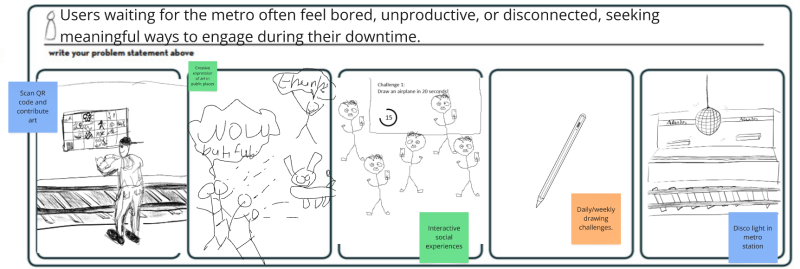
Figure 16: Users Needs

7.2.4 The Idea
In a metro station, an interactive digital art installation allows individuals to scan a QR code and create digital drawings on their mobile devices. The artworks are projected onto a wall, resulting in a collaborative exhibition where participants can see and appreciate each other's creations. To encourage creativity, a fresh theme will be introduced weekly, along with daily challenges to stimulate a variety of artistic interpretations. For those who enjoy a hands-on approach or want to create more complex designs, a tablet will be provided for use. Furthermore, the installation presents opportunities for partnerships with brands, allowing them to showcase targeted advertisements within the area.
This global vision integrates technological advancement, encourages brainstorming and spontaneous creativity, and modernizes the art-making process, ultimately aiming to enhance the artistic and cultural landscape for everyone.
7.3 Concept
The visualisation of the concept for DrawYourWay is explored through its key components: corporate identity, app design, app development, projector features, and marketing and feedback. Each element is critical in shaping the platform's identity, functionality, and success, establishing Draw Your Way as a dynamic hub for artistic expression and community engagement. Therefore, the Figure 17 illustrates this concept. The conceptualisation phase of the project outlines fundamental aspects related to the platform's identity and functionality.

7.4 Design
7.4.1 Structure
Initial structural drafts
The initial drafts were made as soon as the team did the brainstorming to capture the idea that was finally agreed upon.
These drawings shown in figure 18 show how the phone would look like while drawing, the dimensions of the box, how the projector would look in the metro station and finally how the tablet where people can draw would be. Naturally, these were the initial drawings and are the idea that the team had in mind. During this chapter you can see how the idea has evolved.


Material selection
To make DrawYourWay accessible to people without or with a less good phone, a tablet will be placed in the metro station. A tablet protective case has been developed for the protection and safety of the tablet.
For the tablet protective case it was chosen to make it from ABS. ABS is suitable for this application because it can be produced precisely and simply, it has a smooth finish, a good strength to wait raitio and it also has good properties for heat and moisture that can occur in the public metro stations. [Proto Labs, 2025]
Figure 19 shows how the tablet protective case is put together. The tablet protective case consists of 3 parts. The case itself, the sliding lid and the lock. Placing the tablet is done as follows, first the tablet must be placed in the bottom of the sliding lid. Then the sliding lid can be slid over the case by means of two guides (one above and one below) until it reaches the stop at the end of the case. The tablet is now clamped between the tablet rim and the sliding lid. To charge the tablet, an opening has been made in the tablet rim so that a charger fits between the tablet. To ensure that the sliding lid cannot be removed, a lock has been mounted.

For mounting the case on location, three possibilities have been made on the inside, see figure 20. For the first two, the holes for wall and table mounting have been made. With these holes, the case can be screwed to a wall or table on location. If neither of these two situations is possible, the case can be mounted on a pole using the clamp. The case can then be fixed in the middle of the clamp bolt. To ensure that the cables can be removed from the case in any situation, two cable openings have been made. These are expected pieces in the casing that can be pressed out.

Detailed drawings
The final design is shown below. It consists of two main modules and the security system.
Regarding the casing that covers the tablet, it in grey color, a neutral one, and has the logo marked deeper, as can be seen in figure 21. The locking system can be seen in detail, thanks to which the tablet will not move from its place and the well-being of the project can be ensured.

As for the mobile and/or tablet application, this is the final proposal aesthetically. The idea is that the brand identity is always present, whether with the logo, its colors, or both.
In figure 22 you can see the main screen, the home screen and the screen where you draw. On the main screen the brand logo appears and directs you directly to the home screen where you must log in or if you do not have an account, create one. It also has the option to forget your password.
The last image shows the canvas for drawing. You have the option to choose the desired color and also if you want to draw with a pencil, brush or marker or if you just want to erase. It also includes the button that must be pressed once the drawing is finished.

Finally in figure 23 is shown how the projector would look. As always it has the logo visible. It shows all the different drawings, the name of the place is displayed and the theme of the week.

3D model with load and stress analysis
In the following paragraph there will be shown two situations where stress simulations are done to see what the tablet protective case will do. The simulations simulate a situation where a person, wants to steel the tablet whit his/her bare hands, or someone just fails and use the case to catch him/her self. The forces that will be used are 100 kg. There is chosen for 100 kg because this is a upper average body weight of a person. The casing is made from ABS. ABS hase a permissible stress of 15e+6 N/m^2.
In Figure 24 you can see the stress results of someone pulling 100 kg on the tablet slide. It shows that highly performing stress 3.768e+6 N/m^2 is.

In Figure 25 you can see the stress results of someone pushing 100 kg on the tablet. It shows that highly performing sterss 1.161e+6 N/m^2 is.

The highest occurring stress occurs when pulling on the tablet slide. The occurring stress remain below the allowable stress with a safety factor of almost 4. This makes it safe to say that the tablet case will not break under the possible occurring forces.
Colour palette
In figure 26 we can see the colour palette of the brand and logo.
As it's explained in chapter 4.6.5 Brand, the main colors, blue, green and yellow, were chosen for a reason, to convey the following. Blue is a welcoming, connecting and calm color that invites everyone to participate in the artistic project, green represents how everyone can grow artistically by practising whenever they want with Drawyourway and promotes clean spaces by reducing vandalism, and finally yellow is the color that makes the public see the project fun, positive, and above all, as a very good tool for expressing oneself and for enjoyment.
The secondary colors are flesh and black. Despite being secondary colors, they are the ones that add contrast and make the design solid, clear and structured.

7.4.2 Smart System
Hardware
Include and explain in detail the:
Blackbox diagram Figure 27

Explanation: This diagram represents an interactive drawing or projection system where users input data by scanning a QR code or using a tablet with a drawing board. The data is processed through a Blackbox, which includes a power suply that powers the controller/computer, the charging unit for the projector and the tablet and the wifi booster. A communication modules than makes sure that the controller/computer connect to external apps and a web server.
The following table 16 shows the updated power budget analysis for the whole project. Because there are not that many physical components and all the devices use a power supply converting 230 V AC to DC, this remains a relatively short and simple analysis.
| Component | Voltage (V DC) | Current (A) | Power (W) |
|---|---|---|---|
| Tablet | 5 | 2.4 | 12 |
| Controller | 5.1 | 5 | 25.5 |
| Projector | 20 | 3.25 | 65 |
| Total | 30.1 | 10.65 | 102.5 |
Device Power Supply References:
- Tablet (iPad Air 3): 5 VDC / 2.4 A via 12W adapter [Apple Support, 2024]
- Controller (Raspberry Pi 5): 5.1 VDC / 5 A via 27W USB-C PD [CanaKit, 2025]
- Projector (Optoma ML1080): 20 VDC / 3.25 A [Optoma, 2025]
Power Cost Analysis
This body provides an operational cost analysis for the power consumption of the project located in Porto, Portugal. The analysis includes energy usage and cost calculations for various time intervals and a general formula using a variable electricity price.
Power Budget Overview
The system includes three main components:
- The tablet consumes around 12 watts,
- The controller uses approximately 25.5 watts,
- The projector draws the most, at about 65 watts.
Together, these components consumes in total a DC power consumption of 102.5 watts during operation.
Accounting for Power Supply Efficiency
The average efficiency of typical power adapters and transformers is approximately 83.2% [Gao Kening, 2016].
Therefore, to determine the actual AC power drawn from the grid, the following calculation is used:
\begin{equation} P_{\text{AC}} = \frac{P_{\text{DC}}}{0.832} \end{equation}
Calculating with the DC power consumption, gives:
\begin{equation} P_{\text{AC}} = \frac{102.5}{0.832} \approx 123.18\text{ W} \end{equation}
Operating Hours
The system will operate during metro open hours: 6:00 AM to 1:00 AM, making a total of 19 hours per day.
Additional intervals considered:
- 1 hour (testing or partial operation)
- 8 hours (standard working day)
- 19 hours (full operational day)
Energy Consumption
To calculate energy in kilowatt-hours (kWh), we use the formula:
\begin{equation} E = \frac{P \cdot t}{1000} \label{eq:energy} \end{equation}
Where:
- $E$ = Energy in kilowatt-hours (kWh)
- $P$ = Power in watts (W)
- $t$ = Time in hours (h)
Calculated Values (based on AC consumption):
| Duration | Energy (kWh) | Formula |
|---|---|---|
| 1 hour | 0.12318 | $(123.18 × 1) / 1000$ |
| 8 hours | 0.98544 | $(123.18 × 8) / 1000$ |
| 19 hours | 2.34042 | $(123.18 × 19) / 1000$ |
Cost Formula
Let $x$ be the electricity price in €/kWh.
- Cost for 1 hour: $0.12318 × x$
- Cost for 8 hours: $0.98544 × x$
- Cost for 19 hours (daily): $2.34042 × x$
- Monthly (19 hours/day): $2.34042 × 30 × x$
- Annual (19 hours/day): $2.34042 × 365 × x$
Using an average price rate in Portugal from 2024 [Eurostat, 2024]: $x = 0.1867 €/kWh$
| Duration | Cost Formula | Cost (€) |
|---|---|---|
| 1 hour | $0.12318 × 0.1867$ | 0.023 |
| 8 hours | $0.98544 × 0.1867$ | 0.184 |
| 19 hours | $2.34042 × 0.1867$ | 0.437 |
| 30 days | $70.2126 × 0.1867$ | 13.11 |
| 365 days | $854.2605 × 0.1867$ | 159.57 |
Summary
By factoring in the average efficiency of the power supplies, the power drawn from the mains is 123 W.
Over one year of daily 19-hour operation, the project would consume approximately 854.26 kWh, costing about 160 € at 0.1867 €/kWh.
Additionally, hosting the project online will require a domain, which is estimated to cost €11 per year. This does not include a contingency & maintenance buffer nor any installation costs.
7.4.3 Software


| Use Case | Description |
|---|---|
| User Accounts & Access | Users sign up with username, email, and password. The system verifies data and creates secure profiles. Returning users log in using username/email and password. Password resets happen via email links without data loss. Settings, drawing history, and sharing stay saved in accounts. |
| Drawing Tools & Storage | Users create art on mobile devices with touch controls or on dedicated hardware linked by QR codes. Devices offer advanced tools like pressure sensitivity and layers. Drawings save automatically with version control and metadata. |
| Community Feed & Interaction | The feed shows art from followed and public users, sortable by date, popularity, or style. Users can like, comment in threads, and share, fostering conversations. Following artists customizes feeds and recommendations adapt to activity. |
| Sharing & Permissions | Artists get unique URLs to share work online linking to their profiles and QR codes for physical display. Privacy controls allow public, limited, or private sharing, adjustable anytime. |

| Story Title | Description |
|---|---|
| New User Registration | As a creative person, I want to create an account by providing username, email, and password. The system should verify my email and confirm registration so I can save my drawings and use the platform. |
| Returning User Login | As a returning user, I want to log in quickly and securely using username or email plus password. The system should remember my preferences and offer auto-login on trusted devices. |
| Password Recovery | If I forget my password, I want to get a secure reset link via email without losing my drawings or settings. |
| Mobile Drawing Creation | As a mobile user, I want to create drawings on my phone or tablet with various brushes and tools that respond to touch for quick idea capture. |
| Device-Based Drawing | As a serious artist, I want to use precise hardware connected via QR code, with features like pressure sensitivity, tilt, and customizable tools. |
| Drawing Management | As a prolific artist, I want to organize drawings by date, title, or project, search through them, and delete outdated work. |
| Feed Exploration | As a community member, I want to browse inspiring art with filters based on interests and smooth loading. |
| Artist Following | As a fan, I want to follow favorite artists, get notified of new posts, and manage my follow list easily. |
| Artwork Engagement | As an active user, I want to like and comment on art so my feedback is visible, encouraging discussion. |
| URL Sharing | As an artist, I want to share my work with clean URLs that display nicely and link back to my profile. |
| QR Code Integration | As an user, I want to scan place QR'code in order to draw new drawing for this place. |
Software Components
| Option | Languages / SDKs | Backend Languages | Pros | Cons |
|---|---|---|---|---|
| Flutter | Dart, Skia engine | Node.js, Python, Java | Pixel-perfect UI across platforms; AOT→high performance; rich widget library | Requires Dart skills; app binary size larger than RN |
| React Native | JavaScript/TypeScript | Node.js, Python, Java | Leverage JS/React skills; native UI components; JSI bridge reduces latency | Bridge complexity; performance slightly lower than Flutter in heavy UI |
| Native (iOS/Android) | Swift/Kotlin | Node.js, Python, Java | Full access to native APIs; mature platform performance | Double development cost and time; harder to maintain feature parity |
| Progressive Web App | HTML/CSS/JS | Python (Django) [recommended] | Quick deployment, offline caching; single codebase for web & mobile | Lower performance; limited hardware access; UX inferior to native |
| NativeScript / Ionic | JS/TS + native bridge | Node.js, Python | Easy to pick web dev skills; access to native APIs | Performance not as strong; less ecosystem maturity |
For rapid prototyping, using a Progressive Web App (PWA) developed with React on the frontend and Django as the backend framework is the most effective solution. Django stands out for its rapid development capabilities, built-in admin interface, strong security, and excellent support for REST APIs. This combination will allow the DrawYourWay team to build and iterate on a functional prototype quickly, minimizing initial development effort while maintaining scalability and maintainability.
7.4.4 Packaging
In the next chapter, the packaging solution for transporting the components to the location is shown. The packagine solution is designed so it has a second life on location.
The packaging of the components is divided into two parts.
The first part is a step up box. In this step up box, the tablet protective case with the tablet itself will be placed. After removing the components on location, the box can be used as an extra step for children who cannot reach the tablet. For this packaging solution, plywood was chosen. Producing plywood is cost-efficient and eco-friendly. It is also a strong type of wood that will be needed since people will be standing on it. It is also lighter than other types of wood, which makes transport easier. [FA Mitchell & Co Pty, 2025]
Figure 31 shows how the step up box is put together. The supporting beams will be slid into the grooves in the side walls. Then the top side will be placed on the supporting beams. After these steps, the front and back side will be mounted to the tip side and the side roller by means of dowels and sustainable glue. The entire step up box with the dowels will be made of plywood. For safety of the people walking past the box, the edges are rounded.
To place and remove the protective case for the tablet and the tablet that is inside, the bottom plane is removable. Removing the removable pins from the sides will lower the bottom plane.


To make sure that the step up box is strong enough to stand on, a stress simulation was done for when someone weighing 150 kilos stands on it. The allowable stress of multiplex is 10 e+6 N/m^2. In figure 33 it can be seen that the occurring stress is 3.377 e+6. The occuring safety factor on the box is almost 3, so the step up box is strong enough to stand on.

The second part is for the projector and the micro controller. Since the protective case for the projector is already made and used to protect the projector on location, it is most sustainable to also use it as packaging for transport. For the protective case was chosen to use stainless steel. Stainless steel is a strong material that is needed to protect the projector. It is also rustproof which ensures that it will not corrode and weaken.
Figure 16 shows how the protective case projector is put together. The protective case itself will be bent and welded using sheet metal. At the back is a hinge with a lock so that the projector can be placed in the protective case and locked. On the sides cooling vins are placed to make sure the projector doesn't over heat. Four treaded rods will be used to hang the protective case. The rods make it possible to level the protective case and change its height where necessary. To cover the bothem side of the treaded rods for safety, the tread caps are placed.

To make sure that the protective case is strong enough to carry its own weight plus the weight of the projector, a stress simulation was done. In figure 35 it can be seen that the occurring stress remains well below the allowable stress of stainless steel and is therefore strong enough.

7.5 Prototype
Refer main changes in relation to the designed solution.
7.5.1 Structure
In order to make the prototypes a few choices were made to simplify this see figure 36. First, the protective case for the projector will not be made. This is not necessary to show the operation. In addition, a few adjustments were made to the tablet protective case. This will be made of PLA instead of ABS. PLA has fewer mechanical and chemical properties that are needed to eventually use on location, but good enough for prototyping. Also, the holes for wall and table mounting, cable openings and camp will not be made on the tablet protective case because these are not needed for the prototype. Next to that, the prototype wil be printed in two parts and than glued together. This was done to speed up the printing proces but as a result of the qualitie was less good.

7.5.2 Hardware
Detail and explain any change made in relation to the designed solution. In case there are changes regarding the hardware, present the detailed schematics of the prototype.
For the hardware, two adjustments were made so that the prototyping falls within the 100 euro budget.
First, an old projector was chosen instead of buying the chosen new projector see figure 37.

Second, an old PC will be used instead of using the raspbarry Pi see figure 18.

7.5.3 Software
The prototype's key functionalities were implemented using a combination of Django (for the backend) and React (for the frontend). This allowed the creation of a Progressive Web App (PWA), making the system accessible both through web browsers and on mobile devices.
The system’s logic and functionality align with the flowcharts presented earlier, which outline the application's data flow and structure.
Implemented prototype features
- User login and account registration
- Viewing of locations and related drawings
- Drawing interface accessible from the app
- Scanning QR codes for specific locations and linking them with relevant drawings


7.5.4 Tests & Results
Test environment
The tests were conducted on a computer located in the ISEP classroom. This machine simultaneously served as both the frontend and backend server for the users. Its specifications were as follows: a 3.2 GHz Intel Pentium G3250 processor, 4 GB of RAM, and Windows 10 as the operating system.
Hardware tests
To see if DrawYourWay works and meets the test in 1.6 and tabel 17 , the prototype was tested in a metro station, see figure 43 and figure 44.
| Test | Definition for cost | Pass/Fail |
|---|---|---|
| 1 | Functionality Testing | Pass |
| 2 | Real-Time Display Test | Pass |
| 3 | User Experience Testing | Pass |
| 4 | Connectivity Test | Pass |
| 5 | Theme Rotation Test | Fail |
| 6 | Moderation Test | Fail |
| 7 | Hardware Durability Test | Pass |
| 8 | Energy Consumption Test | Fail |
| 9 | Maintenance & Support Test | Fail |


During testing, it was confirmed that DrawYourWay meets function 1 to 4 and 7.
Test 5 was not a priority during the development of the software and was therefore not implemented in the prototype.
To make test 6 work, a completely new software/AI would have to be developed. There was insufficient time for this after the completion of the prototype and was therefore not implemented.
It was not possible to perform test 8. Due to the use of alternative hardware, a different value will emerge than the final product will have.
Due to the use of other alternative hardware, it was also not possible to simulate test 9, the potential technical issue.
Software tests
See below the full document regarding the testing of the software and figure 45 and figure 46 zoomed in on the request stats and the response times.


7.6 Summary
During the development of the prototype, several adjustments were made compared to the original design to simplify the process and stay within the available budget, while still ensuring that the core functionalities could be demonstrated.
Regarding the structure, some practical decisions were taken. The protective case for the projector was not produced, as it was not essential for showing the system’s operation during testing. Additionally, modifications were made to the tablet’s protective case: instead of using ABS, PLA was used. While PLA has lower mechanical and chemical resistance, it was a good alternative for the prototyping phase. Furthermore, the prototype version of the tablet case excluded holes for wall and table mounting, cable openings, and clamps since these were unnecessary for this stage. To speed up production, the case was printed in two parts and then glued together, which slightly reduced the quality of the finish but made the process more efficient.
In terms of hardware, two main changes were implemented to remain within the €100 budget. An old projector was repurposed instead of acquiring a new one, and an old PC was used in place of the originally planned Raspberry Pi. These substitutions did not affect the testing of the main functionalities but did limit the scope of some hardware-specific tests.
The software for the prototype was built using Django for the backend and React for the frontend, resulting in a Progressive Web App (PWA). which makes the system accessible via both web browsers and mobile devices. The prototype’s software features included user login and registration, the ability to draw drawings, a drawing interface, and QR code scanning functionality to link specific locations with relevant drawings.
Both hardware and software underwent a series of tests to evaluate the performance. Hardware tests were conducted in a metro station environment to assess real-world functionality. Of the nine tests, the prototype successfully passed Functionality Testing, Real-Time Display Test, User Experience Testing, Connectivity Test, and Hardware Durability Test. Theme Rotation and Moderation Tests were not completed due to time constraints and development priorities. Energy Consumption and Maintenance & Support Tests could not be performed effectively because the alternative hardware used in the prototype would not have provided representative results for the final product.
Software testing included a detailed analysis of system request statistics and response times, confirming stable and reliable performance for the implemented functionalities. A full report detailing these results was compiled and made available for reference.
In conclusion, the prototype successfully demonstrated the core concept and main functions of the DrawYourWay system, providing valuable insights for future iterations and development phases.
8. Conclusions
8.1 Achievements
During the DrawYourWay project, the most important objective was achieved. Namely, creating a system with which users can create art and that is projected in a metro station, in order to make waiting times more fun and interactive. By combining the QR code, the available tablet and pen and the step up box, DrawYourWay can be used by everyone.
In addition to achieving the most important objectives, there are still a number of things that have not been tested or are still missing. For example, there is no concrete plan yet to prevent people from making and uploading inappropriate drawings. DrawYourWay has also only been tested on a small scale. So no conclusion can yet be drawn whether the system can handle rush hour in the metro stations, for example. It is also unclear how many people will actually use it and whether the available space on the wall is sufficient to clearly display all drawings. In addition, DrawYourWay was also intended to prevent graffiti vandalism. In order to test this properly, DrawYourWay will have to be present on location for a longer period of time in order to actually see the results around the metro station.
8.2 Future Development
The DrawYourWay project is successful and the concept has been proven to work. Despite the fact that it works, there are always future developments that can be made. In this chapter, a number of proposals are made that are expected to make DrawYourWay even better in the future.
In the future, the DrawYourWay project can be expanded to other locations instead of just the metro stations. This will increase the visibility and use of DrawYourWay. By making a few small adjustments in the language of the app, DrawYourWay can also go international.
Next to that rewards ar given for the best drawing, rewards can also be used for, for example, daily or weekly users. This encourages people to participate more often and makes the user experience more fun.
Due to the growth of Artificial Intelligence, in the future there may be an AI-based feedback that gives feedback to DrawYourWay users. For example, AI can compare the made drawings, with styles of well-known artists. This can make the drawing experience of the users more fun and encourage them to do even better with drawing.
To improve the users experience it would be better if there were more tablets on location or an alternative way for the touchscreen function of the tablet. During testing it turned out that drawing works better on this than on a phone for example.
Bibliography
- report.txt
- Last modified: 2025/06/25 16:45
- by team2